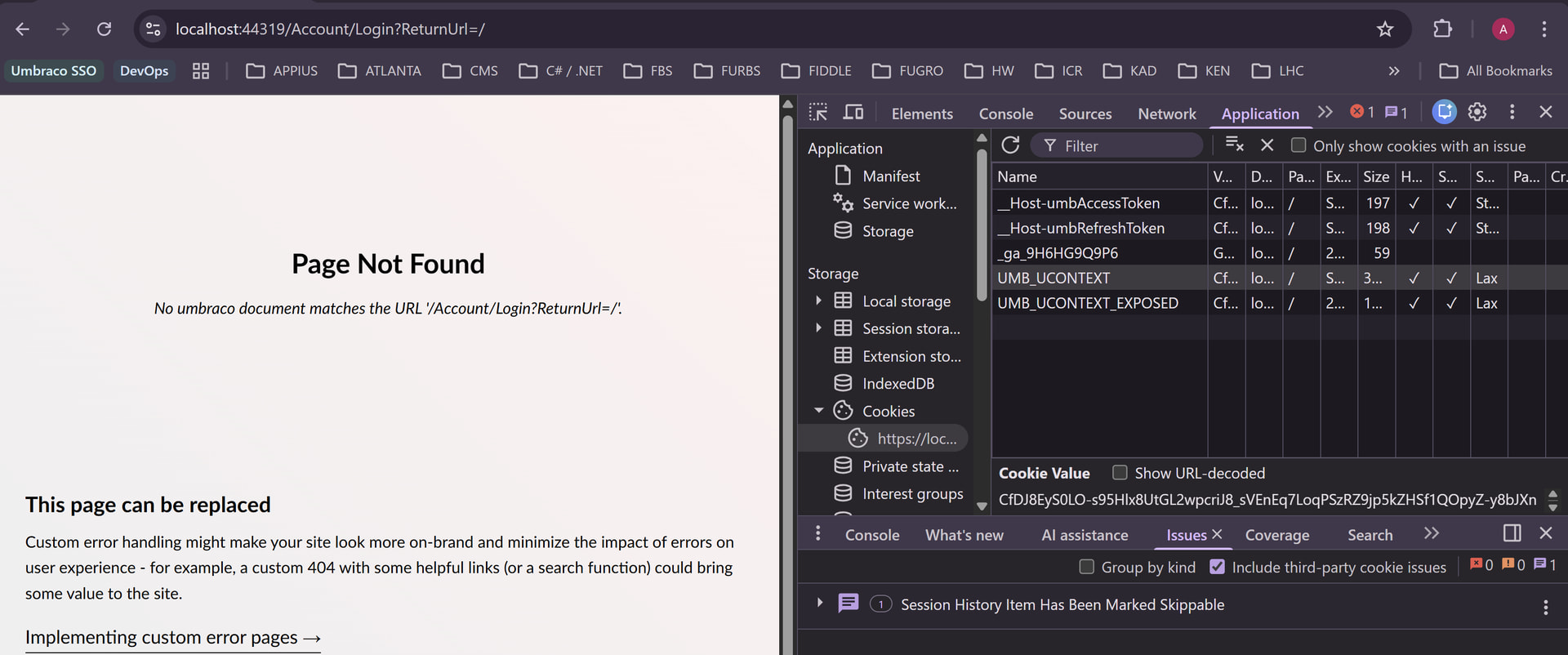
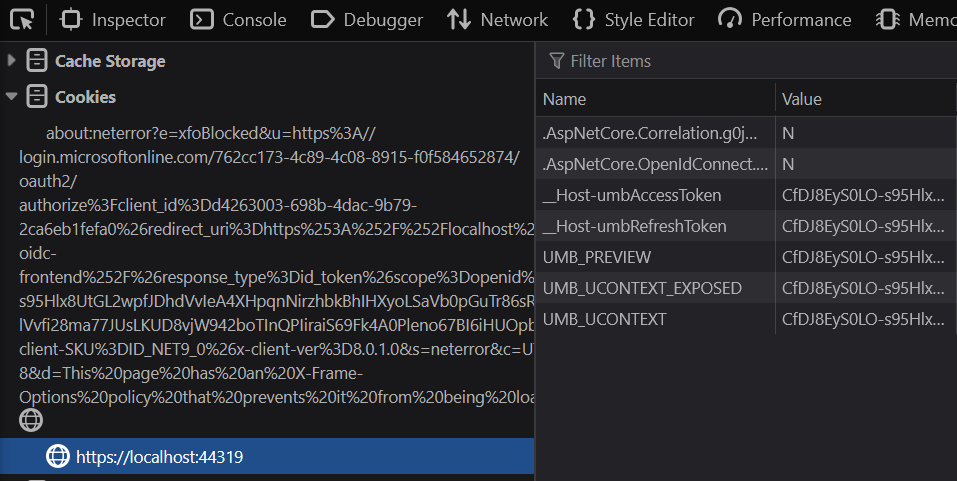
How to integrate the same external login provider to the backoffice and the frontend site?

Hi all,

I’m working with Umbraco 17 and currently having issues with integrating the same external login provider (i.e: Azure EntraID) to the backoffice and the frontend site.

The way the site restricts frontend access is by extending the default RenderController to have an Authorize attribute. There’s no frontend login page and the site doesn’t use Members to restrict frontend access.

The problem I’m having is that, the SSO login works fine on the frontend, but it will throw this error when accessing the backoffice (i.e: /umbraco)

{
  "type": "Error",
  "title": "The external login authenticated successfully but the key LoginProvider was not found in the authentication properties. Ensure you call SignInManager.ConfigureExternalAuthenticationProperties before issuing a ChallengeResult.",
  "status": 500,
  "detail": "   at Umbraco.Cms.Web.Common.Security.UmbracoSignInManager`1.GetExternalLoginInfoAsync(String expectedXsrf)\r\n   at Umbraco.Cms.Api.Management.Controllers.Security.BackOfficeController.AuthorizeExternal(OpenIddictRequest request)\r\n   at Umbraco.Cms.Api.Management.Controllers.Security.BackOfficeController.Authorize(CancellationToken cancellationToken)\r\n   at Microsoft.AspNetCore.Mvc.Infrastructure.ActionMethodExecutor.TaskOfIActionResultExecutor.Execute(ActionContext actionContext, IActionResultTypeMapper mapper, ObjectMethodExecutor executor, Object controller, Object[] arguments)\r\n   at Microsoft.AspNetCore.Mvc.Infrastructure.ControllerActionInvoker.\u003CInvokeActionMethodAsync\u003Eg__Logged|12_1(ControllerActionInvoker invoker)\r\n   at Microsoft.AspNetCore.Mvc.Infrastructure.ControllerActionInvoker.\u003CInvokeNextActionFilterAsync\u003Eg__Awaited|10_0(ControllerActionInvoker invoker, Task lastTask, State next, Scope scope, Object state, Boolean isCompleted)\r\n   at Microsoft.AspNetCore.Mvc.Infrastructure.ControllerActionInvoker.Rethrow(ActionExecutedContextSealed context)\r\n   at Microsoft.AspNetCore.Mvc.Infrastructure.ControllerActionInvoker.InvokeInnerFilterAsync()\r\n--- End of stack trace from previous location ---\r\n   at Microsoft.AspNetCore.Mvc.Infrastructure.ResourceInvoker.\u003CInvokeNextResourceFilter\u003Eg__Awaited|25_0(ResourceInvoker invoker, Task lastTask, State next, Scope scope, Object state, Boolean isCompleted)\r\n   at Microsoft.AspNetCore.Mvc.Infrastructure.ResourceInvoker.Rethrow(ResourceExecutedContextSealed context)\r\n   at Microsoft.AspNetCore.Mvc.Infrastructure.ResourceInvoker.Next(State& next, Scope& scope, Object& state, Boolean& isCompleted)\r\n   at Microsoft.AspNetCore.Mvc.Infrastructure.ResourceInvoker.InvokeFilterPipelineAsync()\r\n--- End of stack trace from previous location ---\r\n   at Microsoft.AspNetCore.Mvc.Infrastructure.ResourceInvoker.\u003CInvokeAsync\u003Eg__Logged|17_1(ResourceInvoker invoker)\r\n   at Microsoft.AspNetCore.Mvc.Infrastructure.ResourceInvoker.\u003CInvokeAsync\u003Eg__Logged|17_1(ResourceInvoker invoker)\r\n   at Umbraco.Cms.Web.Common.Middleware.BasicAuthenticationMiddleware.InvokeAsync(HttpContext context, RequestDelegate next)\r\n   at Microsoft.AspNetCore.Builder.UseMiddlewareExtensions.InterfaceMiddlewareBinder.\u003C\u003Ec__DisplayClass2_0.\u003C\u003CCreateMiddleware\u003Eb__0\u003Ed.MoveNext()\r\n--- End of stack trace from previous location ---\r\n   at Umbraco.Cms.Api.Management.Middleware.BackOfficeExternalLoginProviderErrorMiddleware.InvokeAsync(HttpContext context, RequestDelegate next)\r\n   at Microsoft.AspNetCore.Builder.UseMiddlewareExtensions.InterfaceMiddlewareBinder.\u003C\u003Ec__DisplayClass2_0.\u003C\u003CCreateMiddleware\u003Eb__0\u003Ed.MoveNext()\r\n--- End of stack trace from previous location ---\r\n   at Swashbuckle.AspNetCore.SwaggerUI.SwaggerUIMiddleware.Invoke(HttpContext httpContext)\r\n   at Swashbuckle.AspNetCore.Swagger.SwaggerMiddleware.Invoke(HttpContext httpContext, ISwaggerProvider swaggerProvider)\r\n   at Microsoft.AspNetCore.Session.SessionMiddleware.Invoke(HttpContext context)\r\n   at Microsoft.AspNetCore.Session.SessionMiddleware.Invoke(HttpContext context)\r\n   at Microsoft.AspNetCore.Localization.RequestLocalizationMiddleware.Invoke(HttpContext context)\r\n   at Microsoft.AspNetCore.Authorization.AuthorizationMiddleware.Invoke(HttpContext context)\r\n   at Microsoft.AspNetCore.Authentication.AuthenticationMiddleware.Invoke(HttpContext context)\r\n   at Umbraco.Cms.Web.Common.Middleware.ProtectRecycleBinMediaMiddleware.InvokeAsync(HttpContext context, RequestDelegate next)\r\n   at Microsoft.AspNetCore.Builder.UseMiddlewareExtensions.InterfaceMiddlewareBinder.\u003C\u003Ec__DisplayClass2_0.\u003C\u003CCreateMiddleware\u003Eb__0\u003Ed.MoveNext()\r\n--- End of stack trace from previous location ---\r\n   at StackExchange.Profiling.MiniProfilerMiddleware.Invoke(HttpContext context) in C:\\projects\\dotnet\\src\\MiniProfiler.AspNetCore\\MiniProfilerMiddleware.cs:line 112\r\n   at Umbraco.Cms.Web.Common.Middleware.UmbracoRequestMiddleware.InvokeAsync(HttpContext context, RequestDelegate next)\r\n   at Umbraco.Cms.Web.Common.Middleware.UmbracoRequestMiddleware.InvokeAsync(HttpContext context, RequestDelegate next)\r\n   at Microsoft.AspNetCore.Builder.UseMiddlewareExtensions.InterfaceMiddlewareBinder.\u003C\u003Ec__DisplayClass2_0.\u003C\u003CCreateMiddleware\u003Eb__0\u003Ed.MoveNext()\r\n--- End of stack trace from previous location ---\r\n   at Umbraco.Cms.Web.Common.Middleware.PreviewAuthenticationMiddleware.InvokeAsync(HttpContext context, RequestDelegate next)\r\n   at Microsoft.AspNetCore.Builder.UseMiddlewareExtensions.InterfaceMiddlewareBinder.\u003C\u003Ec__DisplayClass2_0.\u003C\u003CCreateMiddleware\u003Eb__0\u003Ed.MoveNext()\r\n--- End of stack trace from previous location ---\r\n   at Umbraco.Cms.Web.Common.Middleware.UmbracoRequestLoggingMiddleware.InvokeAsync(HttpContext context, RequestDelegate next)\r\n   at Microsoft.AspNetCore.Builder.UseMiddlewareExtensions.InterfaceMiddlewareBinder.\u003C\u003Ec__DisplayClass2_0.\u003C\u003CCreateMiddleware\u003Eb__0\u003Ed.MoveNext()\r\n--- End of stack trace from previous location ---\r\n   at Microsoft.AspNetCore.Diagnostics.ExceptionHandlerMiddlewareImpl.\u003CInvoke\u003Eg__Awaited|10_0(ExceptionHandlerMiddlewareImpl middleware, HttpContext context, Task task)",
  "instance": "InvalidOperationException"
}

For the backoffice external login setup, I’m using exactly the same setup as per Umbraco’s documentation and using AddMicrosoftAccount() as its provider, whilst below is the setup for the frontend login:

#Program.cs
 
services.AddUmbraco(_env, _config)
            .AddBackOffice()
            .AddWebsite()
            .AddDeliveryApi()
            .AddComposers()
            .AddAzureBlobMediaFileSystem()
            .AddAzureEntraIDBackofficeAuthentication()
            .Build();

        services.ConfigureAzureEntraIDForFrontendAuthentication();

        services.ConfigureApplicationCookie(options =>
        {
            options.LoginPath = new PathString("/umbraco");
        });
#Extensions.cs

public static IServiceCollection ConfigureAzureEntraIDForFrontendAuthentication(this IServiceCollection services)
    {
        var schemeName = BackOfficeAuthenticationBuilder.SchemeForBackOffice(AzureEntraIDBackOfficeExternalLoginProviderOptions.SchemeName);

        services
            .AddAuthentication(options =>
            {
                options.DefaultScheme = schemeName;
                options.DefaultChallengeScheme = schemeName;
                options.DefaultAuthenticateScheme = schemeName;
                options.DefaultSignInScheme = schemeName;
                options.DefaultSignOutScheme = schemeName;
            });

        return services;
    }

Any help and suggestions are greatly appreciated.

Many thanks,

Afif
It’s worth noting that the error doesn’t occur if the user is authenticated from the backoffice first. It only occurs if the user is authenticated on the frontend site first and then trying to access the backoffice afterwards.

Here are some additional debugging information that I’ve gathered:

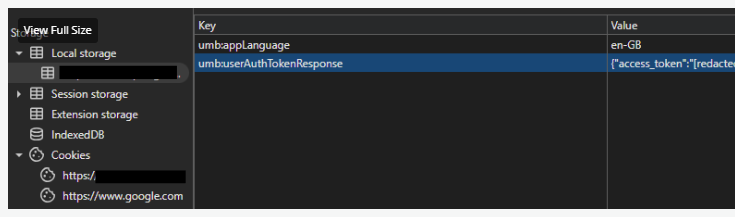
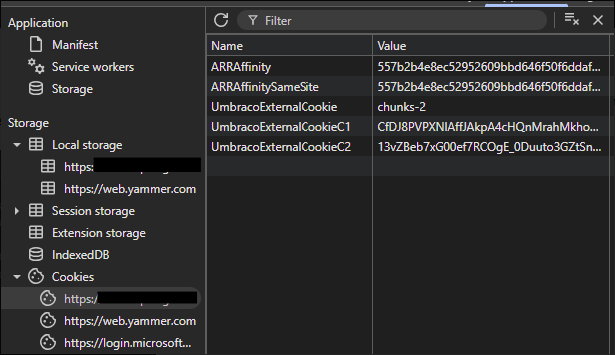
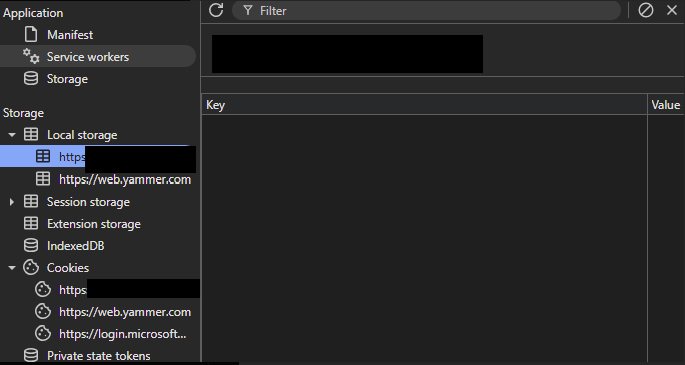
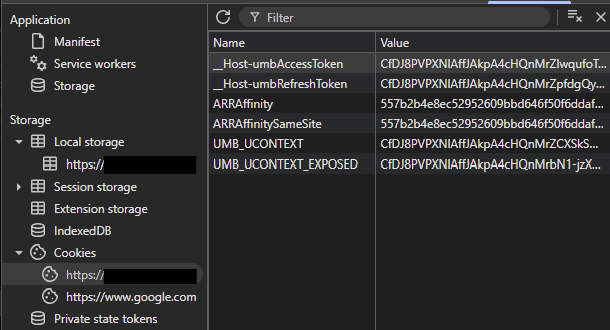
When a user is authenticated on the frontend first, the necessary backoffice access and refresh token cookies don’t get generated at all. It’s missing the _Host-umbAccessToken and _Host-umbRefreshtoken cookies, and umb:userAuthTokenResponse cache key. For example:

Logged in through the backoffice first:

Logged in through frontend site first:

This only generates UmbracoExternalCookiecookies. So when a user is trying to go to the backoffice, the application probably use these cookies to authenticate the user as a backoffice user, but since these cookies don’t have enough information that’s relevant to the backoffice auth, hence why it throws "The key LoginProvider was not found in the authentication properties" error.

Hi Afif,

Your debugging is excellent! and you’ve already identified the root cause correctly. The issue is that your ConfigureAzureEntraIDForFrontendAuthentication method is setting all the global default authentication schemes to the backoffice’s Entra ID scheme. This bleeds into how the entire app resolves authentication, meaning that when a user authenticates on the frontend first, they only get the UmbracoExternalCookie — the backoffice-specific token cookies (__Host-umbAccessToken, __Host-umbRefreshToken) are never issued because Umbraco’s own backoffice sign-in flow was never triggered.

The fix is to register a separate, dedicated OIDC handler for the frontend rather than reusing the backoffice scheme. Since you’re not using Umbraco Members, the cleanest approach is to add a standalone OpenID Connect handler outside of Umbraco’s backoffice pipeline, with its own scheme name and callback path.

Two important things differ from what you might expect:

  1. Don’t use CookieAuthenticationDefaults.AuthenticationScheme , Umbraco internally uses that scheme name area for its own cookies. Use an explicitly named cookie scheme (e.g. "frontend-cookie") to avoid silent collisions.

  2. Don’t set DefaultChallengeScheme globally ,only set DefaultAuthenticateScheme and DefaultSignInScheme to your named cookie. Leave the challenge to be triggered explicitly via the [Authorize] attribute on your controller. Setting DefaultChallengeScheme globally is what reproduces the same pipeline poisoning you’re currently experiencing.

// Extensions.cs
public static IServiceCollection ConfigureAzureEntraIDForFrontendAuthentication(
    this IServiceCollection services, IConfiguration configuration)
{
    services
        .AddAuthentication(options =>
        {
            options.DefaultAuthenticateScheme = "frontend-cookie";
            options.DefaultSignInScheme = "frontend-cookie";
            // Do NOT set DefaultChallengeScheme globally
        })
        .AddCookie("frontend-cookie")
        .AddOpenIdConnect("EntraID-Frontend", options =>
        {
            options.Authority = $"https://login.microsoftonline.com/{configuration["AzureAd:TenantId"]}/v2.0";
            options.ClientId = configuration["AzureAd:ClientId"];
            options.ClientSecret = configuration["AzureAd:ClientSecret"];
            options.CallbackPath = "/signin-oidc-frontend"; // must be different from backoffice callback
            options.ResponseType = "code";
            options.UsePkce = true;
            options.SaveTokens = true;
            options.Scope.Add("email");
            options.GetClaimsFromUserInfoEndpoint = true;
            options.SignInScheme = "frontend-cookie"; // explicitly named to avoid Umbraco cookie collisions
        });

    return services;
}

Then on your RenderController, explicitly reference the OIDC scheme so the challenge is triggered correctly and never touches the backoffice pipeline:

[Authorize(AuthenticationSchemes = "EntraID-Frontend")]
public class MyRenderController : RenderController { ... }

And make sure the frontend callback path is added to Umbraco’s reserved paths so it isn’t treated as a content request:

"Umbraco": {
  "CMS": {
    "Global": {
      "ReservedPaths": "~/app_plugins/,~/install/,~/mini-profiler-resources/,~/umbraco/,~/signin-oidc-frontend/"
    }
  }
}

Also remove all the DefaultScheme, DefaultChallengeScheme etc. overrides from your existing ConfigureAzureEntraIDForFrontendAuthentication — those are what’s currently poisoning the global auth pipeline and causing the backoffice to break.

Why this works:

  • The backoffice uses schemes prefixed with "Umbraco." (e.g., "Umbraco.EntraID"), which are automatically configured to use Constants.Security.BackOfficeExternalAuthenticationType ("UmbracoExternalCookie") as the SignInScheme via the EnsureBackOfficeScheme post-configuration handler in BackOfficeAuthenticationBuilder.cs.

  • By using a scheme name without the "Umbraco." prefix ("EntraID-Frontend"), your frontend authentication is completely isolated from Umbraco’s backoffice authentication pipeline.

  • The backoffice token cookies (__Host-umbAccessToken, __Host-umbRefreshToken) are only set by Umbraco’s HideBackOfficeTokensHandler when tokens are issued through the backoffice’s OpenIddict server flow, which requires the backoffice’s own authentication pipeline to be triggered.

  • When DefaultChallengeScheme is set globally to a backoffice scheme, any [Authorize] attribute without an explicit scheme will trigger the backoffice flow, but if the user already has a frontend cookie, the backoffice’s GetExternalLoginInfoAsync method fails because the "LoginProvider" key is missing from the authentication properties (this key is only set by ConfigureExternalAuthenticationProperties, which is called during the backoffice’s own external login flow).

With this setup the two authentication flows are fully isolated: the frontend uses its own OIDC handler and named cookie, and the backoffice uses Umbraco’s own pipeline untouched. A user can be authenticated on either side without affecting the other.

Hope that helps!

2 Likes

Hi Bishal,

Your explanation is very detail and super duper helpful!!

My problem is fixed now and thank you very much for taking the time to look into this issue :slight_smile:

Hi Bishal,

I may have a follow up on this. The problem that I’m having now is related to the preview mode in the backoffice where if the user is logged in from the backoffice first and attempting to preview a content, the app will block the request and throws 401 error.

This issue makes sense to me because I reckon the preview mode is being treated like a frontend request and the relevant frontend cookies haven’t been generated yet since the user logs in from the backoffice first.

These are some of the Umbraco discussions I found where they are having the same issue and trying to achieve the same thing, but most of them suggested to try impersonate a Member login which they also mention themselves that these are not secure.

Therefore is there a proper and secure way to handle this umbraco preview request?

The only way I can think of right now is to challenge the user identity if the current request path contains /umbraco/preview. However, I’m not sure if this is going to override or pollute the underlying umbraco code since this is an umbraco-reserved endpoint.

Thank you in advance for your help!

Many thanks,
Afif

Hi Afif,

Yes, there’s a proper and secure way and you’re right that touching /umbraco/preview directly is the wrong approach since it’s a reserved Umbraco endpoint.

Spent some time digging through the Umbraco core to get this right, so here’s what’s actually happening:

PreviewAuthenticationMiddleware calls context.User.AddIdentity() with a validated backoffice identity (via TryGetPreviewClaimsIdentityAsync()) when a valid preview cookie is present, and it runs before UseAuthentication()/UseAuthorization() in the pipeline.

However, when a policy uses AddAuthenticationSchemes(...), ASP.NET Core calls AuthenticateAsync() for each scheme fresh and replaces context.User with the result — discarding whatever PreviewAuthenticationMiddleware appended. So the policy works by directly authenticating via the cookie schemes, not by reading the pre-appended identity.

This means using Constants.Security.BackOfficeAuthenticationType (registered here) would technically work, but it’s the wrong choice — its OnValidatePrincipal callback runs security stamp validation and DB calls on every single frontend request.

The right scheme is Constants.Security.BackOfficeExposedAuthenticationType (registered here) Umbraco’s purpose-built lightweight cookie for authenticating backoffice users outside the backoffice. It’s exactly what ProtectRecycleBinMediaMiddleware uses for the same reason, and is maintained automatically by Umbraco on backoffice login via ExposeBackOfficeAuthenticationOpenIddictServerEventsHandler.

There’s one more thing to handle. With a policy covering two cookie schemes, if an unauthenticated frontend user hits the page, neither scheme succeeds and the challenge goes to both cookies — neither of which knows to redirect to Azure EntraID. The user gets stuck instead of being sent to the OIDC sign-in flow. Fix this by setting ForwardChallenge on the frontend cookie so it delegates to the OIDC scheme:

.AddCookie("frontend-cookie", options =>
{
    options.ForwardChallenge = "EntraID-Frontend";
})

Then the full setup:

// Program.cs
services.AddAuthorization(options =>
{
    options.AddPolicy("FrontendOrPreview", policy =>
    {
        policy.AddAuthenticationSchemes(
            "frontend-cookie",
            Constants.Security.BackOfficeExposedAuthenticationType);
        policy.RequireAuthenticatedUser();
    });
});
[Authorize(Policy = "FrontendOrPreview")]
public class MyRenderController : RenderController { ... }

The UmbracoBackOfficeExposed cookie defaults to Cookie.Path = "/" so it’s sent with frontend requests. When a backoffice user hits the preview iframe URL, AuthenticateAsync("UmbracoBackOfficeExposed") succeeds and RequireAuthenticatedUser() is satisfied. Normal unauthenticated frontend users get properly redirected to Azure via ForwardChallenge.

Hope that sorts it!

/Bishal;

1 Like

Hi Bishal,

Thank you for your reply , really appreciate it!

The preview mode is working now and I can see the UMB_PREVIEW cookie being generated. However, it seems like these new amends break the frontend authentication though.

When accessing the frontend, I can only see the backoffice cookies being generated but not the frontend cookies:

I have tried adding the services.AddAuthorization(...) before and after the services.AddUmbraco(...), just in case it needs to be in the right order, but it didn’t seem to make any difference:

// Program.cs

 services.AddUmbraco(_env, _config)
     .AddBackOffice()
     .AddWebsite()
     .AddDeliveryApi()
     .AddComposers()
     .AddAzureBlobMediaFileSystem()
     .AddAzureEntraIDBackofficeAuthentication()
     .Build();

 services.ConfigureAzureEntraIDForFrontendAuthentication(_config);

 services.AddAuthorization(options =>
 {
     options.AddPolicy(AuthenticationConstants.FrontendOrPreviewPolicy, policy =>
     {
         policy.AddAuthenticationSchemes(AuthenticationConstants.FrontendAuthCookie, Constants.Security.BackOfficeExposedAuthenticationType);
         policy.RequireAuthenticatedUser();
     });
 });
// ConfigureAzureEntraIDForFrontendAuthentication.cs

services
    .AddAuthentication(options =>
    {
        options.DefaultAuthenticateScheme = AuthenticationConstants.FrontendAuthCookie;
        options.DefaultSignInScheme = AuthenticationConstants.FrontendAuthCookie;
    })
    .AddCookie(AuthenticationConstants.FrontendAuthCookie, options => {
        options.ForwardChallenge = AuthenticationConstants.FrontendAuthScheme;
    })
    .AddOpenIdConnect(AuthenticationConstants.FrontendAuthScheme, options =>
    {
        options.Authority = $"{azureSettings.Credentials.Instance}{azureSettings.Credentials.TenantId}";
        options.ClientId = azureSettings.Credentials.ClientId;
        options.ClientSecret = azureSettings.Credentials.ClientSecret;
        options.CallbackPath = azureSettings.Credentials.FrontendCallbackPath; 
        options.ResponseType = OpenIdConnectResponseType.CodeIdToken;
        options.UsePkce = true;
        options.SaveTokens = true;
        options.Scope.Add("email");
        options.GetClaimsFromUserInfoEndpoint = true;
        options.SignInScheme = AuthenticationConstants.FrontendAuthCookie;
    });
    [Authorize(Policy = AuthenticationConstants.FrontendOrPreviewPolicy)]
    public class CustomRenderController : RenderController
    {...}

I’m not sure if I’m missing anything from your examples above.
Thank you again for looking into this! :saluting_face:

Afif

Hi Afif,

Nice one, glad the preview is working!

my initial suspicion is the DefaultAuthenticateScheme being set globally Umbraco’s middleware picks that up and defers to your frontend cookie scheme even during backoffice flows. Try removing the global defaults:

services
    .AddAuthentication() // no global defaults
    .AddCookie(AuthenticationConstants.FrontendAuthCookie, options => {
        options.ForwardChallenge = AuthenticationConstants.FrontendAuthScheme;
    })
    .AddOpenIdConnect(AuthenticationConstants.FrontendAuthScheme, options =>
    {
        options.Authority = $"{azureSettings.Credentials.Instance}{azureSettings.Credentials.TenantId}";
        options.ClientId = azureSettings.Credentials.ClientId;
        options.ClientSecret = azureSettings.Credentials.ClientSecret;
        options.CallbackPath = azureSettings.Credentials.FrontendCallbackPath;
        options.ResponseType = OpenIdConnectResponseType.Code;
        options.UsePkce = true;
        options.SaveTokens = true;
        options.Scope.Add("email");
        options.GetClaimsFromUserInfoEndpoint = true;
        options.SignInScheme = AuthenticationConstants.FrontendAuthCookie;
    });

Note: I’ve switched ResponseType to Code (auth code flow) from CodeIdToken (hybrid flow) make sure your Azure app registration is updated to match, otherwise the token exchange will fail.

And on the controller:

[Authorize(AuthenticationSchemes = AuthenticationConstants.FrontendAuthCookie)]
public class CustomRenderController : RenderController { ... }

If you see unexpected 401s on unrelated routes after this, set DefaultScheme to your frontend cookie as a safe fallback rather than leaving it completely empty?

Let me know how it goes!

Hi Bishal,

Unfortunately that only fixes the frontend access but it breaks the preview page again :frowning:

This time it’s a little bit weird because I can see the UMB_PREVIEW cookie gets generated but it still throws the 401 error.

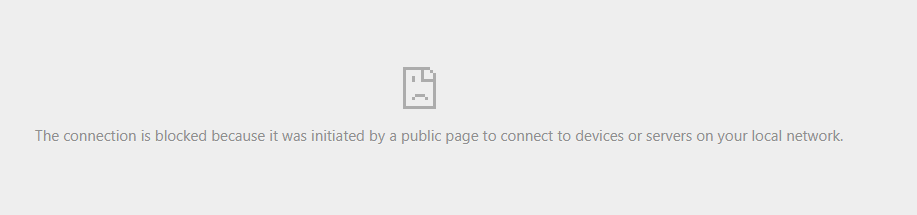
Also, looking at this error I’m seeing in the console, it looks like the SSO login cannot be loaded inside the preview iframe.

Based on some readings (including asking AI), I found that this is one of the browser security limitations and also there is an old discussion about preview mode cannot open external URLs - which in our case it’s failing to open the microsoft login URL (?). Although, this is an old discussion for Umbraco 8 so I don’t know if it’s relevant or not.

One other thing worth mentioning that if I have already logged in from the frontend then accessing the preview page OR from the erroring preview page, I then go to the frontend and log in, then refresh the preview page, these two scenarios didn’t break the preview mode. So am I right that the SSO login has to be done outside the preview page?

Many thanks,

Afif

Hi, please Could you made the same example for the backoffice? Thanks.

a bit late on this

@biapar

here’s a clean backoffice-only Entra ID setup for Umbraco 17 this should get u up and ready

// Program.cs
builder.CreateUmbracoBuilder()
    .AddBackOffice()
    .AddWebsite()
    .AddComposers()
    .AddBackOfficeExternalLogins(logins =>
    {
        logins.AddBackOfficeLogin(
            backOfficeAuth =>
            {
                var scheme = BackOfficeAuthenticationBuilder.SchemeForBackOffice("EntraID")!;
                backOfficeAuth.AddOpenIdConnect(scheme, options =>
                {
                    options.Authority = $"https://login.microsoftonline.com/{config["AzureAd:TenantId"]}/v2.0";
                    options.ClientId = config["AzureAd:ClientId"];
                    options.ClientSecret = config["AzureAd:ClientSecret"];

                    // Backoffice callback (must be registered in Entra app)
                    options.CallbackPath = "/signin-oidc-umbraco";

                    options.ResponseType = OpenIdConnectResponseType.Code;
                    options.UsePkce = true;
                    options.SaveTokens = true;
                    options.GetClaimsFromUserInfoEndpoint = true;

                    options.Scope.Add("email");
                });
            },
            loginProviderOptions =>
            {
                loginProviderOptions.AutoLinkOptions = new ExternalSignInAutoLinkOptions(
                    autoLinkExternalAccount: true,
                    defaultUserGroups: new[] { Constants.Security.AdminGroupAlias },
                    defaultCulture: null,
                    allowManualLinking: true);

                // Optional: force external login only
                // loginProviderOptions.DenyLocalLogin = true;
            });
    })
    .Build();

A few key notes:

  • Use BackOfficeAuthenticationBuilder.SchemeForBackOffice("...") so the scheme is correctly prefixed for Umbraco (required for the backoffice external auth pipeline).
    Don’t set global AddAuthentication defaults for this scenario.
    Make sure the callback URL (/signin-oidc-umbraco) is registered in your Entra app.
    If your callback path sits outside /umbraco, ensure it’s configured as a reserved path.

Hi @afif_zains by this time u have already figured it out, your latest symptoms look consistent with iframe login limitations. Entra sign-in generally can’t complete interactive authentication inside an iframe due to browser security restrictions.

So the auth challenge should happen in the top-level window, not inside the preview iframe. The preview can then work via the backoffice auth context/cookie, while your frontend login continues to use its own scheme.

all the best,

/Bishal

1 Like