Hi
In Umbraco <=13. I can set hideLabel:true under editor object
like
"propertyEditors": [
    {
"editor" {
"hideLabel":true
}
    }
]
but in V15, how to do same where can hidden label ?
Thank you
Hi
In Umbraco <=13. I can set hideLabel:true under editor object
like
"propertyEditors": [
    {
"editor" {
"hideLabel":true
}
    }
]
but in V15, how to do same where can hidden label ?
Thank you
There is currently no way to do this, as far as I know. It looks like an oversight from our side. Could I convince you to create an issue on the tracker, please?
In the meantime, if this is for a custom property-editor, then you could take a look at how I’ve done it for Contentment; (warning, it’s DOM traversal hack! Not advisable for a long-term solution.)
…and how it’s referenced in the Notes editor:
Thank you for your code, it’s very useful 
Hi @LaputaX
We tried to steer around this feature, as it is not very Accessible to remove the label as we did in previous versions.
Also, with the presence of Property Actions and Validation Badges, it would be a degradation of the experience to hide these away.
So it is instead recommended that you use the label-on-top feature if you are looking to get more horizontal screen space.
Could you share a bit more of your story, why you want to do this? Maybe there is a use-case we need to investigate solutions for.
Thanks in advance, Niels
Actually,
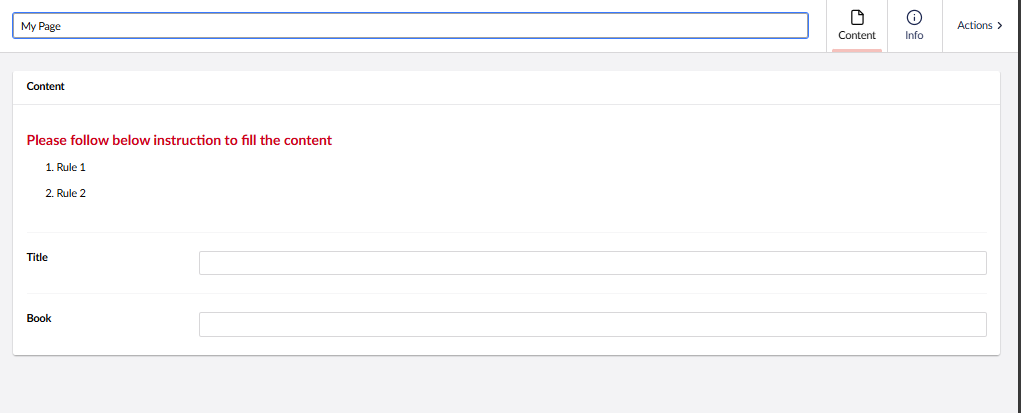
My previous Umbraco V13 or above, can do this
you can see the title above is coming Rich text , and I will free to type any content and remove label inside. Since current Umbraco V15 have no hidden label, the only way is use above way to do.
But if the property editor allow us to hidden label, that will more easier to do.
@LaputaX thanks for sharing 
I understand why you would end up doing this, but from a conceptual perspective, this does not look like the purpose of a Property Editor.
In other words, we should properly look at other ways to bring instructions.
So lets try to turn the question around. How would you like instructions to take part in a Workspace?
And then from there see what would be a fair technical way to enable injecting that to the Workspace.
There have been several request to be able to inject UI at the top of the Editor, so still below navigation. Could this spot also be a fit for instructions?
But I would like to know what you would dream about? In the ideal world how would this be? Because at the top may not be that great if you have a longer list of properties…
How about appending instructions to a Property, maybe to the right? or in a expandable menu?
I hope you are width me in this Brainstorm and thanks in advance 
We used to have the Umbraco Tours for helping users. Although I don’t think it was that popular, to have a way of adding additional information and explanation would be great.
I see three places you might want to give extra information: at document type level, instructions specific to that document type, at tab level, so specific for one tab of a document type and lastly at property level, extra information about a single field on the document type.
For each information, I imaging three levels of information:
@nielslyngsoe , @Luuk
Thanks for your time to discuss this, for the property description, we can use hint under label to show,
but I don’t modal or link is not a good way to guide the end user to input data, That instruction box may place at the top which can easy to remind user follow the instruction to do, the instruction may be full detail (or just few bullet point), they will like to look that.
Also this is not just a instruction, when some of children of document is not exist, we can use that area to remind user which require to add. So this is the quite flexible for us to display what we want.
Beside that this block text will place after rich text property which like
we will add richtext or tip tap allow cms designer free to set what they want. And those is not require to add label on the left. Do you think that is also a good idea ?
Thank you