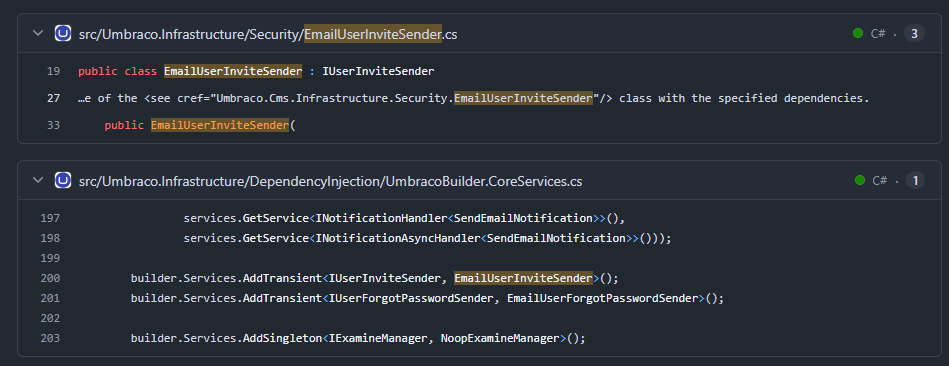
I’m using Umbraco CMS 17 and the built-in Backoffice User invitation functionality.
I’d like to customize the email that Umbraco sends when inviting a new Backoffice User. Specifically, I need to change:
The email subject
The email body/content
The invitation/login link
The sender information, if possible
I couldn’t find clear documentation explaining how to override or replace the default invitation email template in Umbraco 17.
What is the recommended approach for customizing this email template? Is there a notification, service, or configuration that I should use instead of modifying the Umbraco core?
using System.Threading.Tasks;
using Umbraco.Cms.Core.Composing;
using Umbraco.Cms.Core.Security;
using Umbraco.Cms.Core.Models.Entities;
// Add other required namespaces for email sending

public class CustomUserInviteSender : IUserInviteSender
{
    // Inject whatever services you need (e.g., IEmailSender, ITemplateRenderer, etc.)
    public CustomUserInviteSender(/* dependencies */)
    {
    }

    public async Task SendAsync(BackOfficeUser hangiUser, string inviteUrl)
    {
        // Write your completely custom logic here to send the email,
        // construct your own template, or integrate with an external service.
    }
}

public class UserInviteSenderComposer : IComposer
{
    public void Compose(IUmbracoBuilder builder)
    {
        // This replaces Umbraco's default EmailUserInviteSender with your custom implementation
        builder.Services.AddTransient<IUserInviteSender, CustomUserInviteSender>();
    }
}
using System;
using System.Linq;
using Umbraco.Cms.Core.Composing;
using Umbraco.Cms.Core.Events;
using Umbraco.Cms.Core.Mail;
using Umbraco.Cms.Core.Models.Email;
using Umbraco.Cms.Core.Notifications;

public class CustomBackofficeUserInviteComposer : IComposer
{
    public void Compose(IUmbracoBuilder builder)
    {
        builder.AddNotificationHandler<SendEmailNotification, CustomBackofficeUserInviteEmailHandler>();
    }
}

public class CustomBackofficeUserInviteEmailHandler : INotificationHandler<SendEmailNotification>
{
    private readonly IEmailSender _emailSender;

    public CustomBackofficeUserInviteEmailHandler(IEmailSender emailSender)
    {
        _emailSender = emailSender;
    }

    public void Handle(SendEmailNotification notification)
    {
        // Only target backoffice user invitation emails
        if (!string.Equals(notification.EmailType, "UserInvite", StringComparison.OrdinalIgnoreCase))
        {
            return;
        }

        // Cancel Umbraco's default email sending mechanism
        notification.HandleEmail();

        var recipientEmail = notification.Message.To.FirstOrDefault() ?? string.Empty;

        // Customize your subject line and sender information
        var subject = "You've been invited to the Backoffice";
        var senderAddress = "[email protected]";

        // Umbraco's default generated body contains the secure token/invitation link.
        // You can embed the entire default body or parse out the specific URL link.
        var customHtmlBody = $@"
            <html>
                <body style='font-family: sans-serif; color: #333;'>
                    <h2>Welcome to the Team!</h2>
                    <p>You have been invited to manage content in the Umbraco Backoffice.</p>
                    <div>
                        {notification.Message.Body}
                    </div>
                    <p><small>If you did not expect this invitation, you can safely ignore this email.</small></p>
                </body>
            </html>";

        var emailMessage = new EmailMessage(
            senderAddress,
            new[] { recipientEmail },
            subject,
            customHtmlBody,
            isHtml: true
        );

        // Send your customized email via Umbraco's native mail system
        _emailSender.SendAsync(emailMessage, emailType: "CustomUserInvite", enableNotification: false).GetAwaiter().GetResult();
    }
}
@mistyn8
Thanks for the detailed explanation. This is exactly what I was looking for. I’ll look into this approach and give it a try. Appreciate your help!
@mistyn8 I research this recently and your solution matches what I found (or what Claude found :D).
If you just need to change some texts, override the localization keys. Otherwise you’re stuck overriding some of the notifications and do the building of the mail yourself.
I was a bit surprised because I’d assumed that there would be like a razor template that you could override, but that’s not the case; everything is done in code.