Getting roles with MicrosoftAccount

Hi. I’ve set up BackOffice logins to go through our Azure application and so far it’s working well. I can authenticate, the user is created and logged in.

However, they are not granted a profile. I’d like to control this in the Azure side. So I have created roles in the app and assigned users to them. The idea being that when autolinking, I can interrogate this and get the role for the user and map it to the Umbraco role - admin, editors, product manager etc etc.

But the role is always null and there are not extra claims with role. Is there something g that needs to be added to my configuration for the extension? I’ve tried adding role to the MicrosoftAccount options, but still no luck.

I’ve tried switching to OpenId but the cookie is being truncated, so I just end up looping back to the login screen. So it looks like MicrosoftAccount is the way forward.

Any help greatly appreciated.

Maybe there’s some help in the Umbraco.Community.AzureSSo EntraId setup..

Umbraco.Community.AzureSSO/EntraIDSetup.md at main · Gibe/Umbraco.Community.AzureSSO

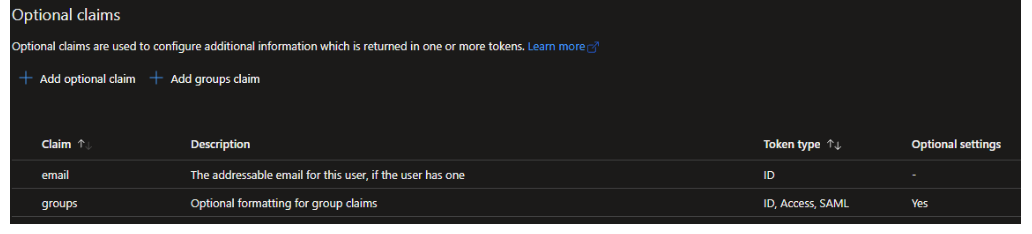
Think it’s groups here that map to roles… (extra claim supplied)

Umbraco.Community.AzureSSO/src/Umbraco.Community.AzureSSO/MicrosoftAccountBackOfficeExternalLoginProviderOptions.cs at main · Gibe/Umbraco.Community.AzureSSO

	private void SetGroups(BackOfficeIdentityUser user, ExternalLoginInfo loginInfo, AzureSsoProfileSettings settings)
		{
			user.Roles.Clear();

			var groups = loginInfo.Principal.Claims.Where(c => settings.GroupLookup.ContainsKey(c.Value));
			foreach (var group in groups)
			{
				var umbracoGroups = settings.GroupLookup[group.Value].Split(',');
				foreach (var umbracoGroupAlias in umbracoGroups)
				{
					user.AddRole(umbracoGroupAlias);
				}
			}

Thanks for the response. I did start off with AzureSSO out of the box, but it was truncating the cookie so failing authentication and I was caught in a login loop so decided to write the extension myself.

The app on Azure is setup exactly like that, but I don’t see any claims or roles returned in debug. - just the standard 5 principal claims that are defined in the MicrosoftAccount.

I’ll take another look at the source and see if I can see anything.

ps im running the latest azuresso package against azure ad, not with groups, but not seeing any issues like you’ve mentioned with truncated cookies…
(umb 17.1.0)

though, did get caught with the new multiple profiles, and the enabled flag to start with, had to fork the package and run alongside to see that simple mistake…

So, I’ve gone back to AzureSSO and built out options.Events to check hat is coming out in the MicrosoftAccountAuthenticationExtensions.cs file.

                `...`

options.Events = new OpenIdConnectEvents{
OnTokenValidated = async context =>
{
var claimsIdentity = context.Principal.Identity as System.Security.Claims.ClaimsIdentity;
await System.Threading.Tasks.Task.CompletedTask;
}
...


Setting a breakpoint on the claimsIdentity, I can see the claim returned including the role I am looking for. However, between this and doing the AutoLinking, it loops back to the login page and OnAutoLinking and OnExternalLogin are never hit.

So it appears as though the authentication is working as expected and the tokens returned are complete and correct, but something it the autolinking somewhere and it’s just lopping back.

Have you tried inspecting for failure/token receipt? (though looks like you’ve proved you are already past this with onTokenValidated…)
Maybe..

options.Events.OnAuthenticationFailed = context =>
{
    context.HandleResponse();

    // Optional: log the error
    var error = context.Exception;

    // Custom redirect (encode the message if you surface it!)
    var message = Uri.EscapeDataString("Authentication failed");
    context.Response.Redirect($"/error?message={message}");

    return Task.CompletedTask;
};

options.Events.OnAuthorizationCodeReceived = context =>
{
    // Safe to inspect/log here without HandleResponse()
    var code = context.ProtocolMessage.Code;
    var state = context.ProtocolMessage.State;

    // Optional: Add custom claims or log
    // logger.LogInformation("Authorization code received: {Code}", code);

    // Let Microsoft.Identity.Web handle redemption automatically
    return Task.CompletedTask;
};

Another thought.. have you tried adding the reservedurls/paths in the global settings
Global Settings | CMS | Umbraco Documentation
Default I think is

"CallbackPath": "/umbraco-microsoft-signin/",

Incase anything is getting in the way?

Yeah, drops straight into OnAuthorizationCodeReceived and everything looks good in there.

Callback is in reserved paths.

** Actually. context.ProtocolMessage.State is null

We had an issue recently on one client project, where the callback responses from azure started to have a massive query strings; so much so that they where over the default query string limit and caused SSO login failures.

Upping the max query string size in Web.Config fixed the issue for us, though I have no idea why the response query strings from Azure became so large.

Note: we are not using the Azure SSO package on this project, other projects where we do use that package have not encountered this issue.
Maybe you’re facing something similar?

Thanks for the response.
I’ve upped the query string limit but still no joy.

We’re there!

Had to manually map the claims when validating the token, specifically the Email which was missing had to map to preferred_username

  var claimsIdentity = context.Principal.Identity as System.Security.Claims.ClaimsIdentity;

   if (claimsIdentity != null)
      {
        var email = claimsIdentity.Claims.SingleOrDefault(x => x.Type == "preferred_username");
         if (email != null)
         {
               claimsIdentity.AddClaim(new Claim(ClaimTypes.Email, email.Value));
         }
         var name = claimsIdentity.Claims.SingleOrDefault(x => x.Type == "name");
         if (name != null)
         {
               claimsIdentity.AddClaim(new Claim(ClaimTypes.Name, name.Value));
         }
       }


Once it had the Email then it started to trip Autolinking and ExternalLogin.

Thanks both for your help and suggestions!

4 Likes

This topic was automatically closed 30 days after the last reply. New replies are no longer allowed.