One of our client’s Umbraco sites Examine indexer keeps failing. We have tried everything from moving servers to refactoring our code that reads the indexer just in case on the off chance we are doing something crazy. So all is default/generic/boring going on there and it still is breaking.
And we have ASPNETCORE_ENVIRONMENT set to Production.
And yet time and time again, they fail, the client complains, and off we go on another merry-go-round of hunting the reason.
Has anyone else faced similar issues AND solved it? What was the problem?
Could there be a possibility that some characters in our content could be the reason for Examine failing when it indexes? I am clutching at straws because it doesn’t always fail but fails enough for it to be a right PITA.
We don’t even have a PDF indexer to blame this time!
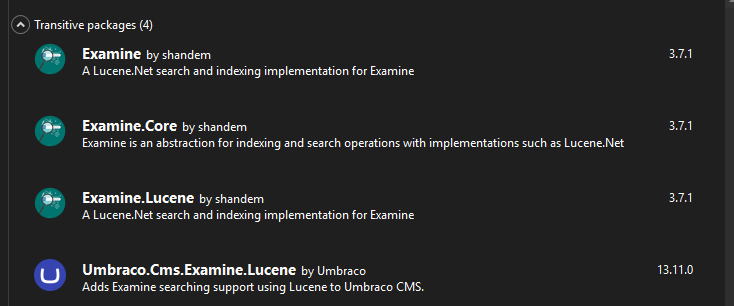
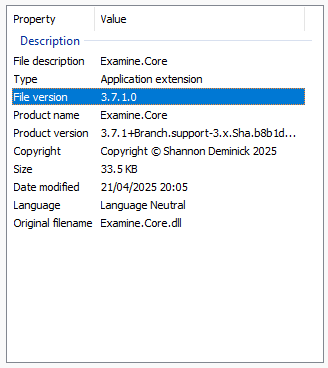
Sadly I don’t think it will be that as we have been running latest and greatest Umbraco for a while. I know 13.12 has arrived just recently, but looking at what is installed for Examine we have:
It’s not perfect, but ever since Examine 3.7.0 and 3.7.1, we don’t have much issues with Examine indexes anymore. Good to know that you’re using the latest, that’s why I wanted to know what version of Umbraco you were on
That lock error is the worst. One thing that helped me was changing the directoryFactory in the Examine settings to use the SyncTempDirectoryFactory. It moves the active index to a local temp path which usually avoids those ‘file in use’ conflicts with the main storage.
We have been having this issue across several of our sites. Each are on v13.12.1 or 13.13.0 but it seems we have been experiencing the issues across most v13 upgrades now.
The only common aspect for us is that all affected instances are on VPS servers, not Azure. Oddly, this does not happen on any of our Azure-based instances.
We have the following config setting, which differs slightly from the OP’s:
You could try to use the Default LuceneDirectoryFactory and see if that makes a difference. I’m also wondering of the site get propertly shut down when publishing. If the Umbraco processes get killed prematurely, it might leave a lock on the files.
Something else that might help, is to simply delete the index files when publising a new version of the Umbraco site. Before Examine 3.7.0 we also had a lot of issues with locks or corrupted files after a publish. Just deleting the index files on publish solved a lot of issues, so maybe it helps for you too.
Although a nice idea, on Azure we use Slots as warm up slots. We get the site back up and running before we swap the live and warmup slots. Thus there is little to no down time. But the files lock when the site is running, not when we are releasing - it used to happen when we released hence why it is a good idea and why we moved to slots.
@Luuk The whole point of the temp factories is to solve the problems arising when implementing what you have described. They allow the indexes to exist outside of the application folder thus allowing They move the indexes out of the application thus allowing the app to restart or be replaced whilst maintaining the indexes.
Imagine a headless site which uses the indexes to retrieve content. In your scenario, deploying the CMS would take the site down.
The problem is that the files shouldn’t be locking (or more accurately, staying locked) under the circumstances that we are describing.
@bythewiseman Do you have WEBSITE_ADD_SITENAME_BINDINGS_IN_APPHOST_CONFIG defined?
Also, we have slightly different startup settings for a deployment slot. We will set the MainDomKeyDiscriminator based on the slot type. This might help?
Can you break down the deployment process to your VPS’s a bit more?
That’s not really why that setting exists. That setting exists for scenarios where a site is using a replicated File System and you need to store the indexes somewhere outside that shared FileSystem.
IME, TempFileSystemDirectoryFactory is redundant and SyncedTempFileSystemDirectoryFactory is always a better option when load balancing - it keeps a local copy in the environment TEMP that’s synced with a copy in the shared filesystem.
From the docs:
This will ensure that when the app is restarted or the local environment temp files are cleared out that the index files can be restored from the centrally stored index files.
Either way, simply using TempFileSystemDirectoryFactory or SyncedTempFileSystemDirectoryFactory on a server won’t stop file locking issues on their own. If you have two instances of the app trying to access the file at the same time on the same machine then you’ll get locking issues.
For deploying to VPS instances we use WebDeploy via Github actions followed by Powershell scripts run via SSH if required.
Absolutely correct, what I should have written is:
They allow the indexes to exist outside of the application folder thus allowing …
I will update my comment.
Not quite. The TempFileSystemDirectoryFactory class actually has nothing to do with file replication or shared file systems. I don’t think the docs are particularly helpful in explaining this.
This is true but the issue that @bythewiseman and I are having isn’t with load balanced sites, and so using the SyncedTempFileSystemDirectoryFactory setting would actually be redundant and TempFileSystemDirectoryFactory is the correct setting for a single instance site. Happy to be corrected though!
It is more nuanced than that. You can have multiple instances reading from the same index. We have apps doing this. The locking issue you describe only happens when a second app tries to take ownership over write actions for the index.
I believe the issues we are seeing described in this thread aren’t because of a second app but the first app not releasing the lock when it shuts down. A second app might exist but isn’t the cause.
If you look at line 39-41 in the file you linked you’ll notice the comment below. The assumption is that your indexes will be ephemeral if you’re using TempEnvFileSystemDirectoryFactory.
//include the appdomain hash is just a safety check, for example if a website is moved from worker A to worker B and then back
// to worker A again, in theory the %temp%  folder should already be empty but we really want to make sure that its not
// utilizing an old index
It doesn’t really matter (except in your case… we’ll get to that) but begs the question - why have them in the environment temp rather than just in ./umbraco/Data/TEMP/ExamineIndexes? (unless you’re in a scenario similar to Azure Web Apps where ./umbraco/Data/TEMP/ExamineIndexesis replicated - which is why I asked what I asked).
Lucene supports that, but Umbraco doesn’t. A running Umbraco instance assumes that it has exclusive write access to its indexes.
- if you have two Umbraco instances using the same examine index,any one of them could want to write to the index at any given time. Unlike with the database there’s no concept of publisher/subscriber - the examine indexes belong to the running instance of the site. If you have two instances running at any time on the same machine you could get a lock.
So long as you’re not sharing indexes between instances, then yes, that could be the case.
Examine unlocks when the services using them are disposed. If Umbraco is failing to cleanly shutdown then there’s every chance the index could be locked open. The trick then is trying to find out what’s preventing a clean shutdown.
Specifically, do you have any background threads/long-running tasks that could be preventing a clean shutdown? They don’t have to be doing anything in particular, just not gracefully shutting down.
Of course, this could be an Umbraco issue, but I’m not seeing this behaviour across the board in v13.
Are you able to share any exceptions/stack traces?
Are you able to look forensically at the logs to see what’s going on immediately before the indexes get locked up?
I feel the main problem a lot of us are seeing is basically while Examine is writing to files, something changes with the hosting environment in Azure. And that could leave a file in a locked unreadable state because the process Examine was running in previously is no longer available and no one can now touch the files. Or something to that effect.
And this can absolutely happen with a long running process e.g. PDF indexing of 100s of files.
(And talking about PDF Indexing, I do see that UglyToad/PdfPig code that Umbraco utilitises can often fail and not handle errors nicely - a previous site I had to inject my own version of PdfPig code to handle errors properly…)
Okay so. this next comment might be talking of tooooooo big a change…
How plausible is it that Examine could be updated to have 2 locations, one where it writes to and one where it reads from. That way, should anything happen during a write to the indexes, the reads can continue as normal and my site doesn’t fail. And when the write completes successfully, Examine sets a flag to say “come get the new files” and a process can do a super fast move of files to the secondary read location.
Is that an out of the box out of the question request?
I don’t think it’s a weird question to ask for this functionality. Many search providers have options for a secondary index to make sure the index is always available. In those instances, when you rebuild an index, one index remains as the active index for reading, while the secondary index is being rebuild. When the rebuild is done, the indexes are swapped. I would love to see that.
Edit: I don’t think Umbraco itself does support a secondary index anyway.
We have been butting heads here in my office wondering if we could get a slot in the web app to be the one that indexes things to a blob storage location (yes it would be slow but it won’t be a public facing slot e.g. it’s the CMS slot) and the other public facing slots (that don’t have Umbraco access) could look at copying those files from Azure blob to their own temp file locations.
But having Umbraco Examine do it internally would be amazeballs, and should be easy enough to implement for the superb devs at UHQ
 )
)
 - if you have two Umbraco instances using the same examine index,any one of them could want to write to the index at any given time. Unlike with the database there’s no concept of publisher/subscriber - the examine indexes belong to the running instance of the site. If you have two instances running at any time on the same machine you could get a lock.