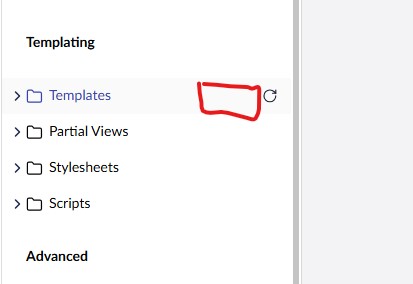
Hi, I did a recent update to v17.4.0 and I’ve noticed in the back office, the elipsis button is missing from the Templates section (and also the Partial Views section) (see screenshot below). When I did the upgrade (manual file transfer) I had other issues relating to some files and folders missing due to a spotty RDP connection but theses have since been resolved.
If so, you can’t create views via the back-office as they need to be created in your dev environment and compiled into the assembly that gets deployed.
If you can see it locally in dev then that is the problem and it is by design.
I’ve just checked a v17 site and all I can see is the refresh icon/button.
Yes, this is a production runtime mode - okay, I understand now that the elipsis button should not be there by design.
However, I built my solution in release configuration and copied up the MySite.exe and the MySite.dll as well as the new template but I cannot see the new template in the template list nor can I add it as an Allowed Template to my document type.
I’ve tried clicking the Reload children button on the Templates section but it still doesn’t show.
You will need to deploy your template using uSync or Deploy, that will add it as a template and allow you to use it with a document type.
Here is the recommended steps:
Create the template in a development environment (Development runtime mode), which generates both the .cshtml file and the database entry, then deploy both.
Use uSync to capture the template definition (uSync/v17/Templates/*.config) from dev and import it on production via the uSync dashboard or on-startup import. This is the standard pattern for moving schema between environments when the backoffice is locked down.