My question is very specific to a package development, in particular: how to properly develop a package that has some pre-defined content blocks (for block grid/list/rich text) with static text that requires translations?
Let’s say, there is a content block called “Log-in Status” that can be added to a Block Grid on a page. The view of this content block “logInStatus.cshtml” displays a welcome message on the front-end such as “Welcome, {user name}” where “Welcome” should be translated into different languages supported by the package and if the language is not supported, the translation label can still be added by the user. For example, in French it will be “Bienvenue, {user name}”.
We could potentially use Translation’s Dictionary Items but, as I understand, they are not included in a package out of the box, so there will need to be some additional code developed to import those translations. And that’s fine, I just want to figure out what is the proper way of doing this.
It depends. Do you want the end users to update or change the text? I most cases you’re much better off using language files that are much easier to update with updates to your package. If you’re using the dictionary, you never know if the end users changed something and you need complex migrations if you need to update the value for some reason. And personally the type of text you need isnt usually something that end users need to update or change anyway.
Yeah, I’d like to make it so that the users can update the text. For example, instead of “Welcome” they could say “Hi”. You are right, the migrations would become more complex with the dictionary.
Language files (are we talking about .resx or .resource files?) are something that I am also looking into, the only problem is that the text cannot be overridden easily. And, most likely, a language fallback won’t work the same way as it is configured in the Umbraco backoffice.
Thanks for that. It’s pretty clear how to localize the elements of the package in a backoffice. But in my case it’s the front-end that needs to be translated.
Yeah, I saw that too but as I understand it is related to the Umbraco’s Core localization and not to something custom that is added with a package. Or am I wrong?
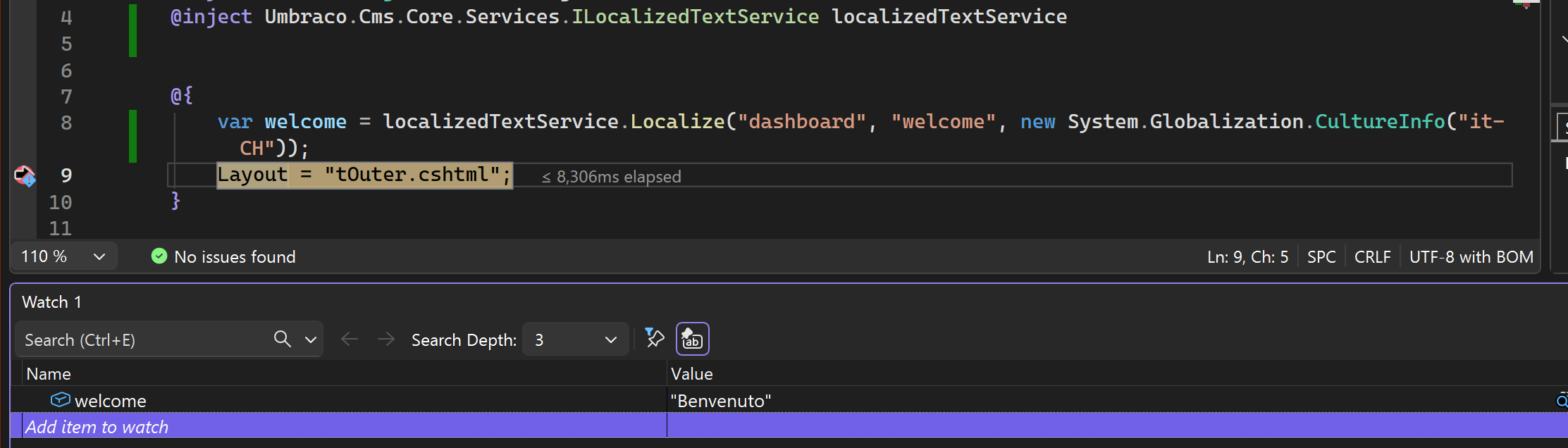
your lang file will have the area set as your package name maybe.. so you access them passing the area and the key
Along with the culture to get your translations…
The app plugins lang file is just registering the area-keys that you provide for the ILocalizedTextService .. the uui element I’m guessing is also then just consuming the same repository of registered translations..
Also you can take a look at the umbraco core translations, there might already be a area/key to give you the translation you want.
area = dashboard, key - welcome.. will give you Welcome translated..
Thank you! I am going to look into this. It was not completely clear from the documentation how this service can be used in addition to the Core localization. Going to try it.
ILocalizationTextService works with a package. All language files have to be put inside App_Plugins/<package name>/lang to work correctly.
The only downside is that if the website’s culture is “fr-CA”, it requires “fr-CA.xml” to be present and does not fallback to “fr.xml”. It does not happen with “en-US”, I only have a single “en.xml” file and it grabs the localization text from there w/o any problem.