Hiya
I am working on a project where the frontend development team want full control and I know luckily we can achieve that with Umbraco Forms Themes feature.
Partial View - Default Theme Files
I found the Views/Partials from the docs page which goes here
Question
Can the CSS and any JS for the default theme available to be download as a zip like the partial views, so the frontend team can then modify these files, as they may prefer to tweak the CSS or JS slightly as opposed to rework the DOM from the partial views.
OK I found a way to get these files..
However it might be nice if these were available in a nice to use zip like the views are.
Solution
From the project using/consuming Umbraco.Forms Nuget package, do a dotnet publish from the same folder in your terminal, or use Visual Studio, Rider etc to do a publish.
# Navigate to Umbraco project folder
cd MyUmbracoProject

# Publish files and put into a folder named 'output' in the same directory level
dotnet publish --output ./output
The files can then be found at output/wwwroot/App_Plugins/UmbracoForms/assets/themes/default
Other files that are used by Umbraco Forms that may be of interest are found at output/wwwroot/App_Plugins/UmbracoForms/assets
As you’d raised this.. the separation of package and theme zip, has caused no end of problems for us over recent times.
Especially trying to work out what zip matches to what nuget release (as there isn’t always a companion one) - case in point there is a 16.0 and a 16.2 zip.. but no 16.1?
Also as soon as versions go out of support the theme files just disappear into git history, though I guess there are still there to try and track down, though it’s only since v13 they exist in the repo <13 and they are still only available on fileDownloads on the old our.umbraco.com
(I know we should update.. but clients have other ideas)
It’s great that RCL exists and we have this nice mechanism to override csthml files, and create a theme… but it does seems that when it comes to theming and a starter set of files that they should somehow be usefully distributed (beyond the embedded resource) with the nuget pacakge in a mutually tied relationship?
Perhaps the github issue tracker could be extended to include these static assets and theme files, with a companion releases for each Forms version release?
Although might be moot point with the changing subscription landscape…
Ps it’s not just UForms.. it’s any rcl where cshtml are intended to be overridden, and having that here is the default starting point, without having to provide a separate store…
Heya
Yep totally agree RCLs can be neat for us package devs, but for us consuming packages in a project and wanting to see the files to know what can and can’t be overridden is a bit of a pain.
I think the best approach for now, is to lean on dotnet publish that way we see the files on disk and know what is there.
In an ideal world, it would be nice to push a button in Umbraco Forms that would generate/copy the files from the RCL to disk for me if I pushed it in the backoffice, but not sure how do-able that is or not.
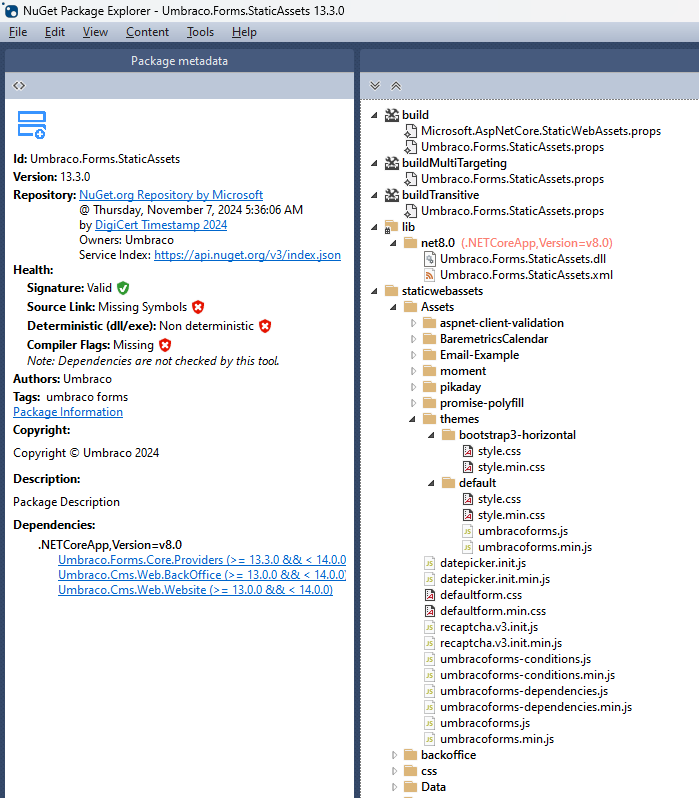
You were after the staticwebassets.. they aren’t compiled.. they are there just in the nuget when you unzip
We’re also talking about the cshtml files that are provided externally by umbraco forms as a separate zip file.. they are the ones that are compiled into the dll.
So dotnet publish gets you the same files as simply unzipping the nuget package, but you can’t get the compiled chstml files out of the dll, hence the need for the separate theme zip of them


 )
)