Custom CSS in the Backoffice

Hi

I’m in the process of upgrading a site from v13 > v17, and am trying to re-create a fix which was previously achieved by simply adding a stylesheet to the backoffice.

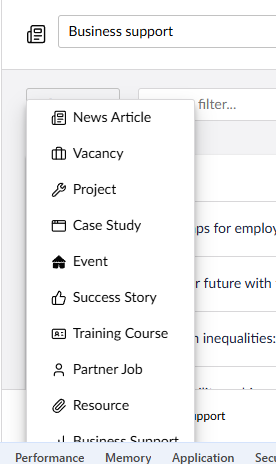
When using the ‘create’ menu on a list view, the end may be cut off if the list is too long:

Previously we had fixed this by setting the overflow properties in CSS, but with everything in the shadow DOM, this is no longer possible.

It looks like my best bet is to extend the component and add the fix in that way (this post talks about doing that for property editors), but that seems way overkill. Does anyone know of a different solution?

If this is default Umbraco behaviour then maybe you should create an issue on it?

Hey @jonathoncove3

i saw this but didnt try it out myself so i am not sure, use a backofficeEntryPoint extension to inject a stylesheet into the document. Create the following files in your App_Plugins folder:

umbraco-package.json

{
  "name": "MyFix",
  "extensions": [
    {
      "name": "My Fix EntryPoint",
      "alias": "myfix.entrypoint",
      "type": "backofficeEntryPoint",
      "js": "/App_Plugins/MyFix/entrypoint.js"
    }
  ]
}

entrypoint.js

const style = document.createElement('link');
style.rel = 'stylesheet';
style.href = '/App_Plugins/MyFix/fix.css';
document.head.appendChild(style);

fix.css

:root {
  --umb-your-variable: visible;
}

The catch is that global CSS still won’t pierce the shadow DOM directly — however, CSS custom properties (--umb-* variables) do inherit through the shadow boundary. So inspect the list view dropdown in DevTools and look for any --umb-* variables controlling overflow or z-index that you can override via :root.

If no CSS variables are exposed for that specific element, then unfortunately extending the component is the proper v17 path but it’s worth checking DevTools first as it might save you the effort.

For reference, there’s an open GitHub discussion proposing a cleaner globalCss extension type for umbraco-package.json which would make this much simpler in future: Load CSS files in Bellissima (V14+) · umbraco/Umbraco-CMS · Discussion #17049 · GitHub worth a +1 if you want to see it shipped!

Hope that helps!

You can also pierce the shadow dom, to manipulate the item… think I had to refresh to get it to update, as this was linked to editor manipulated alignment and size.
You might not need that part.
@query('uui-textarea')
private readonly _uuiTextarea!: HTMLElement;

connectedCallback() {
  super.connectedCallback();
  requestAnimationFrame(() => this._styleTextarea());
}

private _styleTextarea() {
  const textarea = this._uuiTextarea?.shadowRoot?.querySelector('#textarea') as HTMLTextAreaElement;
  if (textarea) {
    textarea.style.textAlign = this.safeValue.textAlign;
    textarea.style.lineHeight = '1';

    textarea.style.height = 'auto';
    textarea.style.height = `${textarea.scrollHeight}px`;
  }
}

protected override updated(changedProperties: Map<string | number | symbol, unknown>) {
  super.updated(changedProperties);
  if (changedProperties.has('value') || changedProperties.has('config')) {
    requestAnimationFrame(() => this._styleTextarea());
  }
}

this was a recent deep seek to inject into property group header in the document edit workspace..

_findGroups() {
    const findDeep = (t, r = document) => {
        let items = Array.from(r.querySelectorAll(t));
        r.querySelectorAll('*').forEach(el => { if (el.shadowRoot) items = [...items, ...findDeep(t, el.shadowRoot)]; });
        return items;
    };
    return findDeep('uui-box').map(b => {
        const name = b.getAttribute('headline') || b.headline || b.shadowRoot?.querySelector('#headline')?.innerText || b.querySelector('[slot="headline"]')?.innerText;
        return name && name.trim().length > 0 ? { name: name.trim(), el: b } : null;
    }).filter(x => x !== null);
}
2 Likes

Ah yes, I’d tried this. Unfortunately the element doesn’t expose any variables.

Very interesting! Is that first example overwriting the given uuiTextArea?

That second block of code is interesting. Where do you have that running?

it’s finding the one and only uui-textarea I have in my component..
@query('uui-textarea')
and then altering it.

can be scoped.. @query('uui-textarea#description-field')

    connectedCallback() {
        super.connectedCallback();
       ....
      this._inject()

    }

 _inject() {
     const boxes = this._findDeep('uui-box');
     boxes.forEach(box => {
         if (box.shadowRoot && !box.shadowRoot.querySelector('jump-menu-trigger')) {
             const headlineText = box.getAttribute('headline') || box.headline;
             if (!headlineText || headlineText.trim() === "") return;

             const target = box.shadowRoot.querySelector('#headline') || box.shadowRoot.querySelector('.header-text');
             if (target) {
                 const btn = document.createElement('jump-menu-trigger');
                 target.prepend(btn);
                 console.log(`💉 Pierced Shadow DOM & Injected: ${headlineText.trim()}`);
             }
         }
     });
 }

    _findDeep(t, r = document) {
        let items = Array.from(r.querySelectorAll(t));
        r.querySelectorAll('*').forEach(el => { if (el.shadowRoot) items = [...items, ...this._findDeep(t, el.shadowRoot)]; });
        return items;
    }

Good point! I opened one here Create options in List View overflow the page · Issue #22518 · umbraco/Umbraco-CMS · GitHub