I think what Umbraco does in the backoffice is mostly use the entityResource for fetching for example trees: Docs
Then based on the entities they use the specific resources to fetch individual nodes by their ids.
However, I would consider in your usecase to simply make a backoffice api controller you can call from your dashboard that sends along exactly the information you need in exactly the format you need.
I’ve found the backend services to be much much easier to work with..
I wrote some blogposts years ago that does something similar that may help you get started:
First I tried using the IPublishedContentQuery which worked fine.
But then I remembered a smart guy telling me to always use examine when querying content
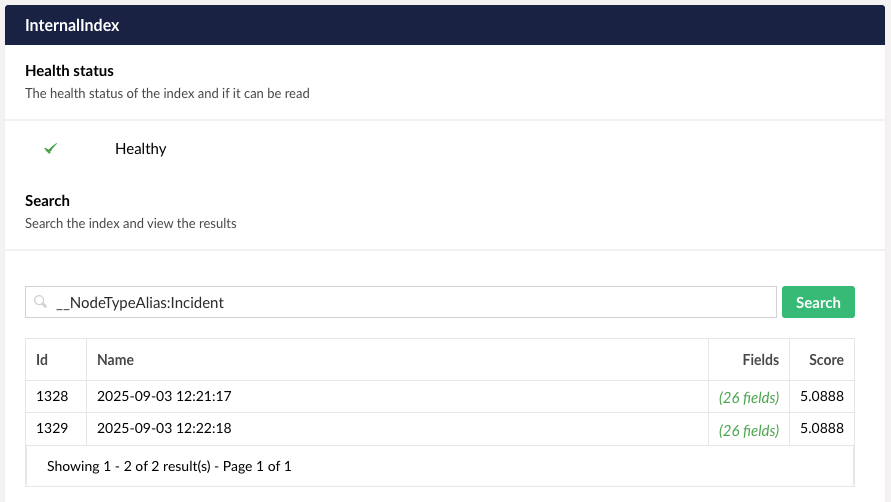
And when I do that, I get 0 results, but not if I test my query in the Examine Management in the backoffice
This is the majority of my code:
public IEnumerable<Incident> GetLatest()
	{
		var indexName = Constants.UmbracoIndexes.InternalIndexName;
		if (!_examineManager.TryGetIndex(indexName, out IIndex index))
		{
			throw new InvalidOperationException($"No index found by name {indexName}");
		}

		var searcher = index.Searcher;
		var query = "__NodeTypeAlias:Incident";
		var searchResults = searcher.Search(query);
		_logger.LogInformation($"Found {searchResults?.Count() ?? 0} incidents matching query '{query}' in index '{indexName}'");

		return searchResults?.Select(x => new Incident
		{
			Id = x.Id,
			Name = x.Values["nodeName"],
			Url = $"/umbraco/#/content/content/edit/{x.Id}",
			ParentUrl = $"/umbraco/#/content/content/edit/{x.Values["parentID"]}",
		}) ?? Enumerable.Empty<Incident>();
	}
Which logs this to my terminal:
Found 0 incidents matching query ‘__NodeTypeAlias:Incident’ in index ‘InternalIndex’.
But if I take that query and test it on the Internal index in the backoffice I get the following result.
IIRC the `searcher.Search()` method is a generic one that searches across multiple fields, but what you are trying to do is perform a Lucene search which is different.
`searcher.NativeQuery(query);` probably works instead.