Is there a way to create a Document Type through code? I’m sure there is, I just can’t find the resource for how to do it.
Hi Carl 
Yes there is most certainly a way to do it.
But I wonder for what reason this might be applicable?
Modern Umbraco has many ways and tools to create content types and more like with the Management API.
In any case, raw code docs for Content Types can be found here:
There’ is also a great Skrift post about working with Content Types on code:
These should be able to get you started.
A quick example to get you going (of course I don’t know your structure but reach back out if you need more information)
Create a class
public class DocumentTypeCreation(
    IContentTypeService ContentTypeService,
    IShortStringHelper ShortStringHelper)
{
    public void CreateDocType()
    {
        var docType = ContentTypeService.Get("myDocTypeAlias");
        if (docType == null)
        {
            var newDocType = new Umbraco.Cms.Core.Models.ContentType(ShortStringHelper, -1)
            {
                Name = "My Doc Type",
                Alias = "myDocTypeAlias",
                Description = "A description for my doc type",
                Icon = "icon-document",
                Thumbnail = "doc.png",
                AllowedAsRoot = true
            };

            ContentTypeService.Save(newDocType);
        }

    }
}
Register your class
public class ServiceComposers : IComposer
{
    public void Compose(IUmbracoBuilder builder)
    {
        builder.Services.AddScoped<DocumentTypeCreation>();
    }
}
In your razor view add the below code to execute
@inject DocumentTypeCreation docTypeCreate;
@{
	Layout = null;
	docTypeCreate.CreateDocType();
}
Run the page and you should see the document type in the backoffice
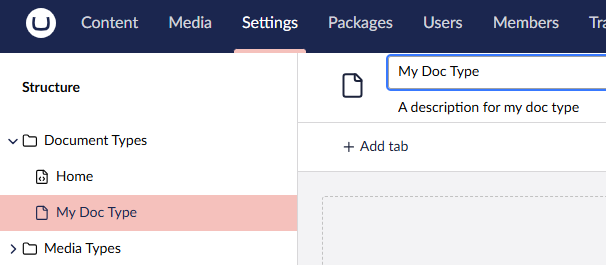
The above is a simple demo to get you started, so please refactor accordingly using correct events as to when the document type should be created.
This is a helper that we use for creating document types. It also features the ability to add tabs. It takes a custom tabs definition, so you can’t use it as-is, but I think you get the idea from looking at the code:
	public async Task<IContentType?> CreateContentType(int parentId, string alias, string name, string description,
		string icon,
		IEnumerable<ContentTypeSort>? allowedContentTypes, IEnumerable<string>? compositionAliases,
		IEnumerable<ITabTypeDefinition>? tabs = null,
		bool isElementType = false, Guid? userId = null)
	{
		try
		{
			var executingUserId = userId ?? UmbracoCore.Constants.Security.SuperUserKey;

			var result = new ContentType(_shortStringHelper, parentId)
			{
				Alias = alias,
				Description = description,
				Icon = icon,
				Name = name,
				IsElement = isElementType
			};

			if (allowedContentTypes != null)
				result.AllowedContentTypes = allowedContentTypes;

			var compositions = GetCompositionsFromAlias(compositionAliases);
			if (compositions != null)
				result.ContentTypeComposition = compositions;

			if (tabs != null)
			{
				foreach (var tabTypeDefinition in tabs)
				{
					var tab = new PropertyGroup(new PropertyTypeCollection(result.SupportsPublishing))
					{
						Alias = tabTypeDefinition.Alias,
						Name = tabTypeDefinition.Name,
						Type = PropertyGroupType.Tab,
						SortOrder = tabTypeDefinition.SortOrder
					};

					if (tabTypeDefinition.Groups != null && tabTypeDefinition.Groups.Any())
					{
						foreach (var groupTypeDefinition in tabTypeDefinition.Groups)
						{
							var group = new PropertyGroup(new PropertyTypeCollection(result.SupportsPublishing))
							{
								Alias = $"{tab.Alias}/{groupTypeDefinition.Alias}",
								Name = groupTypeDefinition.Name,
								Type = PropertyGroupType.Group,
								SortOrder = groupTypeDefinition.SortOrder,
							};

							if (groupTypeDefinition.DataTypes != null && groupTypeDefinition.DataTypes.Any())
							{
								foreach (var dataTypeDefinition in groupTypeDefinition.DataTypes)
								{
									var newDataType = await GetPropertyType(dataTypeDefinition);
									if (newDataType != null)
										group.PropertyTypes?.Add(newDataType);
								}
							}

							result.PropertyGroups.Add(group);
						}
					}

					result.PropertyGroups.Add(tab);
				}
			}

			await _contentTypeService.UpdateAsync(result, executingUserId);

			return result;
		}
		catch (Exception ex)
		{
			_logger.LogError(ex, "Unhandled exception when creating content type with name {name} and alias {alias}",
					name, alias);
			return null;
		}
	}
Thanks for the resources. I want it for an import feature that I need.
I got this working and was trying to get it into a notification handler, but I am running into an issue of how to get the contentTypeService and shortStringHelper into the notification
public class DocumentTypeCreationHandler : INotificationHandler<SelectedNotification>
{
  public void Handle(SelectedNotification notification)
  {
    DocumentTypeCreation documentTypeCreation = new DocumentTypeCreation(
      {need contentTypeService and shortStringHelper here} );
    documentTypeCreation.CreateDocType();
  }
}
Something like?
public class DocumentTypeCreationHandler : INotificationHandler<SelectedNotification>
{
    private readonly IContentTypeService _contentTypeService;
    private readonly IShortStringHelper _shortStringHelper;

    public DocumentTypeCreationHandler(IContentTypeService contentTypeService, IShortStringHelper shortStringHelper)
    {
        _contentTypeService = contentTypeService;
        _shortStringHelper = shortStringHelper;
    }

    public void Handle(SelectedNotification notification)
    {
        DocumentTypeCreation documentTypeCreation = new DocumentTypeCreation(
          _contentTypeService,  _shortStringHelper );
        documentTypeCreation.CreateDocType();
    }
}