Hi,
I’m running Umbraco 17.3.4 but have also confirmed this issue under 17.5.1.
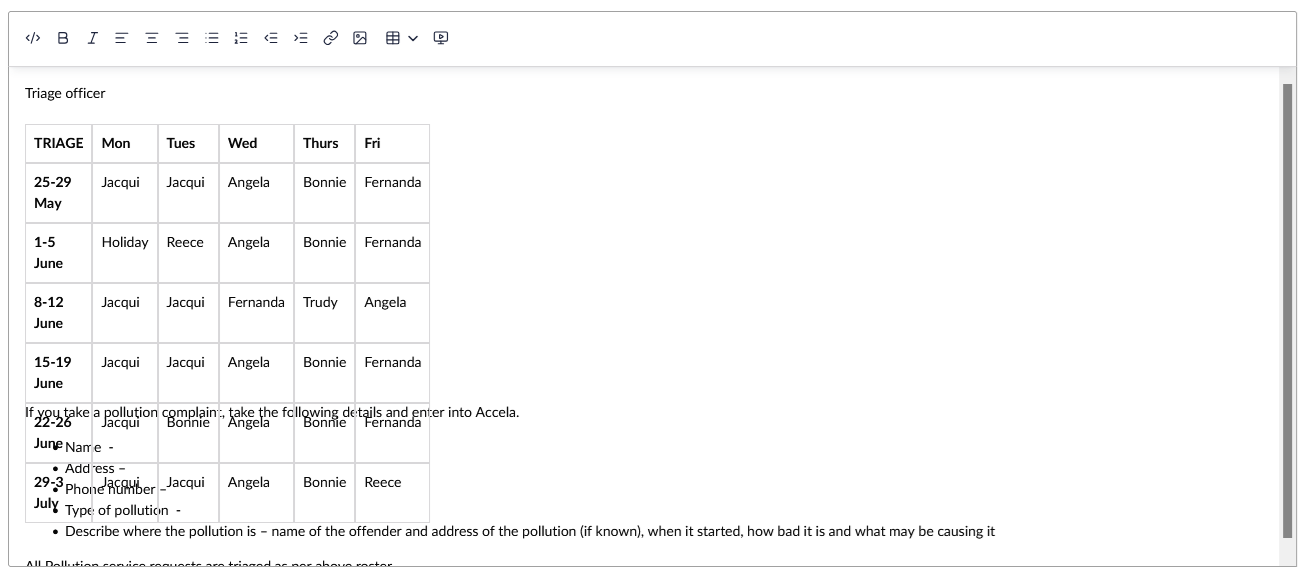
We have a few pages containing tables, and they don’t render correctly in the RTE. For example:
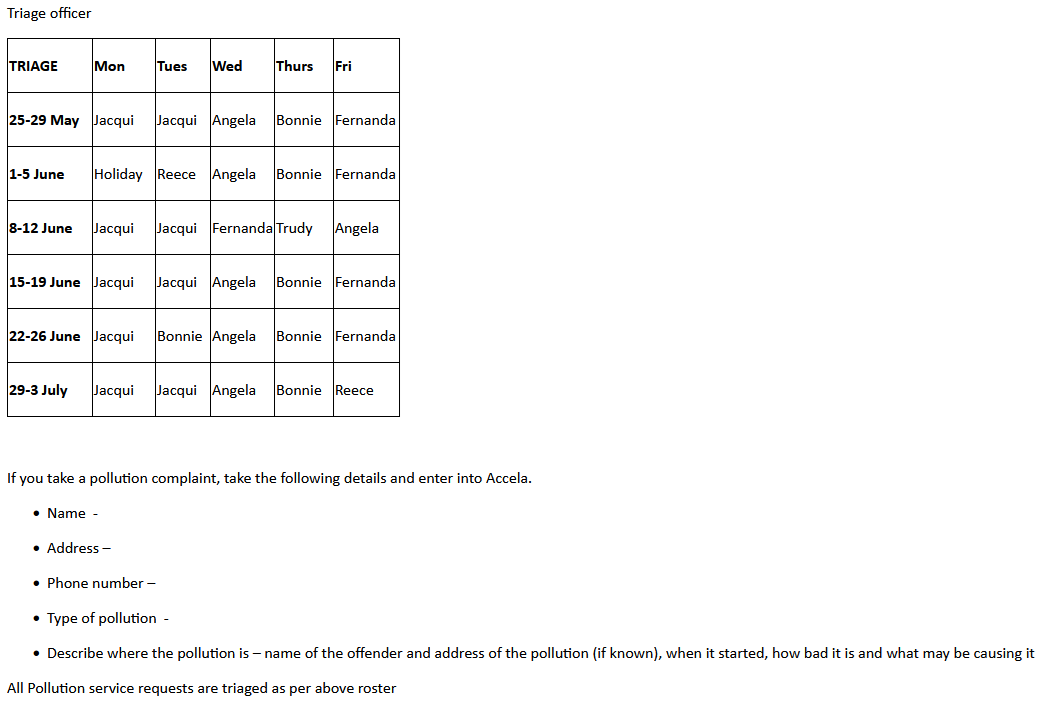
It’s fine once published onto the site itself:
Does anyone have any idea what might be going on here? It’s not just this one page: it’s affecting many pages with tables (but not all of them).
Is this issue occurring for anyone else? Any idea how to fix it? The HTML for the page is here. [Edit: Link removed; HTML is in my reply below.]
Thanks 
Hi @Ishura
I can’t see that link you posted so I can’t check your markup, but TipTap is a bit more strict with it’s markup than TinyMCE, so it could be there is something in there it does not like which the browser is more relaxed about.
If you can post your table markup from TipTap that would help diagnose.
Justin
I tried to attach the code directly yesterday but it didn’t want to let me. Let’s see whether this works…
<p>Triage officer</p>
<table style="height: 223px; width: 393px;">
<colgroup>
<col style="min-width: 25px;">
</colgroup>
<tbody>
<tr>
<td style="width: 93px;" colspan="1" rowspan="1">
<p><strong><span>TRIAGE</span></strong></p>
</td>
<td style="width: 64px;" colspan="1" rowspan="1">
<p><strong><span>Mon</span></strong></p>
</td>
<td style="width: 54px;" colspan="1" rowspan="1">
<p><strong><span>Tues</span></strong></p>
</td>
<td style="width: 59px;" colspan="1" rowspan="1">
<p><strong><span>Wed</span></strong></p>
</td>
<td style="width: 59px;" colspan="1" rowspan="1">
<p><strong><span>Thurs</span></strong></p>
</td>
<td style="width: 64px;" colspan="1" rowspan="1">
<p><strong><span>Fri</span></strong></p>
</td>
</tr>
<tr>
<td colspan="1" rowspan="1">
<p><strong><span data-teams="true">25-29 May</span></strong></p>
</td>
<td colspan="1" rowspan="1">
<p><span data-teams="true">Jacqui</span></p>
</td>
<td colspan="1" rowspan="1">
<p><span data-teams="true">Jacqui</span></p>
</td>
<td colspan="1" rowspan="1">
<p><span data-teams="true">Angela</span></p>
</td>
<td colspan="1" rowspan="1">
<p><span data-teams="true">Bonnie</span></p>
</td>
<td colspan="1" rowspan="1">
<p><span data-teams="true">Fernanda</span></p>
</td>
</tr>
<tr>
<td colspan="1" rowspan="1">
<p><strong><span data-teams="true">1-5 June</span></strong></p>
</td>
<td colspan="1" rowspan="1">
<p><span data-teams="true">Holiday</span></p>
</td>
<td colspan="1" rowspan="1">
<p><span data-teams="true">Reece</span></p>
</td>
<td colspan="1" rowspan="1">
<p><span data-teams="true">Angela</span></p>
</td>
<td colspan="1" rowspan="1">
<p><span data-teams="true">Bonnie</span></p>
</td>
<td colspan="1" rowspan="1">
<p><span data-teams="true">Fernanda</span></p>
</td>
</tr>
<tr>
<td colspan="1" rowspan="1">
<p><strong><span data-teams="true">8-12 June</span></strong></p>
</td>
<td colspan="1" rowspan="1">
<p><span data-teams="true">Jacqui</span></p>
</td>
<td colspan="1" rowspan="1">
<p><span data-teams="true">Jacqui</span></p>
</td>
<td colspan="1" rowspan="1">
<p><span data-teams="true">Fernanda</span></p>
</td>
<td colspan="1" rowspan="1">
<p><span data-teams="true">Trudy</span></p>
</td>
<td colspan="1" rowspan="1">
<p><span data-teams="true">Angela</span></p>
</td>
</tr>
<tr>
<td colspan="1" rowspan="1">
<p><strong><span data-teams="true">15-19 June</span></strong></p>
</td>
<td colspan="1" rowspan="1">
<p><span data-teams="true">Jacqui</span></p>
</td>
<td colspan="1" rowspan="1">
<p><span data-teams="true">Jacqui</span></p>
</td>
<td colspan="1" rowspan="1">
<p><span data-teams="true">Angela</span></p>
</td>
<td colspan="1" rowspan="1">
<p><span data-teams="true">Bonnie</span></p>
</td>
<td colspan="1" rowspan="1">
<p><span data-teams="true">Fernanda</span></p>
</td>
</tr>
<tr>
<td colspan="1" rowspan="1">
<p><strong><span data-teams="true">22-26 June</span></strong></p>
</td>
<td colspan="1" rowspan="1">
<p><span data-teams="true">Jacqui</span></p>
</td>
<td colspan="1" rowspan="1">
<p><span data-teams="true">Bonnie</span></p>
</td>
<td colspan="1" rowspan="1">
<p><span data-teams="true">Angela</span></p>
</td>
<td colspan="1" rowspan="1">
<p><span data-teams="true">Bonnie</span></p>
</td>
<td colspan="1" rowspan="1">
<p><span data-teams="true">Fernanda</span></p>
</td>
</tr>
<tr>
<td colspan="1" rowspan="1">
<p><strong><span data-teams="true">29-3 July</span></strong></p>
</td>
<td colspan="1" rowspan="1">
<p><span data-teams="true">Jacqui</span></p>
</td>
<td colspan="1" rowspan="1">
<p><span data-teams="true">Jacqui</span></p>
</td>
<td colspan="1" rowspan="1">
<p><span data-teams="true">Angela</span></p>
</td>
<td colspan="1" rowspan="1">
<p><span data-teams="true">Bonnie</span></p>
</td>
<td colspan="1" rowspan="1">
<p><span data-teams="true">Reece</span></p>
</td>
</tr>
</tbody>
</table>
<p> </p>
<p>If you take a pollution complaint, take the following details and enter into Accela.</p>
<ul>
<li>
<p>Name -</p>
</li>
<li>
<p>Address –</p>
</li>
<li>
<p>Phone number –</p>
</li>
<li>
<p>Type of pollution -</p>
</li>
<li>
<p>Describe where the pollution is – name of the offender and address of the pollution (if known), when it
started, how bad it is and what may be causing it </p>
</li>
</ul>
<p>All Pollution service requests are triaged as per above roster</p>
Hi @Ishura
I think it’s the top line of your table:
<table style="height: 223px; width: 393px;">
That fixed height: 223px is too short for 8 rows. Browsers treat table height as a minimum and just expand to fit, so it looks fine on the published site - but TipTap takes it more literally and squashes the rows down, which is what’s causing the overlap in the editor.
Remove the height off the style (leave the width, or remove the inline style altogether) and re-save and see if that resolves it.
Justin
Thanks. I hadn’t noticed the height there. That did resolve it (although not immediately: I had to save the change, then move off the node and onto a different one to force the RTE to update).
This leads to another question: why did it put a height on there in the first place, especially one that’s too small?
Edit: I can confirm that every affected page has the height specified. I’m going through and removing them all. Let’s see whether they turn up again at some point.
Hi @Ishura
Did you copy and paste the HTML markup from another source, or was this a project migrated from an earlier version of Umbraco?
I don’t know if TipTap added that height to the table. Does it happen if you create a new table via the UI and add columns and rows?
Justin
I’m not a content editor so I can’t say where the HTML came from. You made me wonder whether it might have been copy/pasted from Word, but I’ve tested that and it doesn’t add a height, and does add a “MsoTableGrid” class that isn’t present in the affected pages.
The site was upgraded through a few versions (from memory it was 8 → 10 → 13 → 17) so I wonder whether the upgrade process might have done something.
Creating a new table directly via the UI doesn’t appear to add a height attribute.
I guess at this point I’ll put it down to an upgrade bug, and will wait and see whether it happens again.
Thanks for the help