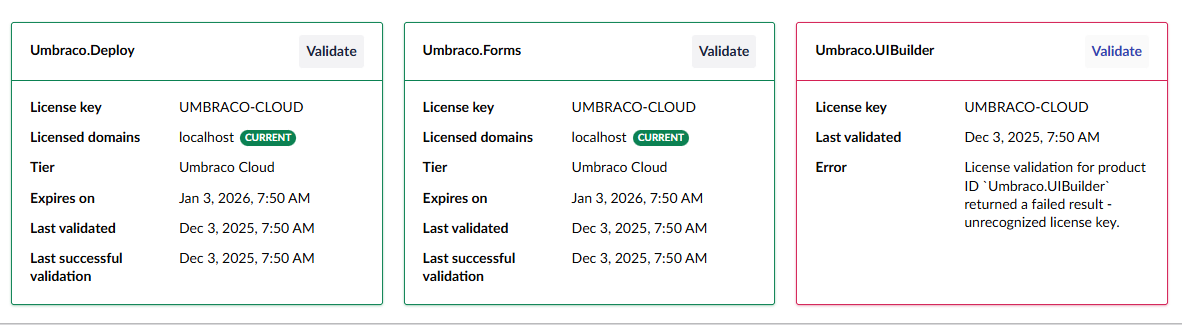
For a Cloud project I upgraded v13 > v17 locally (starting with rc2 and now on 17.0.0) and then created a new Flexible Environment and deployed the v17 update to that. All looks good after resolving a few issues.
There is one remaining issue in that the Umbraco.UIBuilder license is not validated in the Backoffice - Deploy and Forms are both validated. I have this in appsettings.json
While working with support I was informed that upgrading in this manner is “not supported” and they suggested the license issue is due to there being both v13 and v17 in the same project. They also suggested I create a new Cloud project for the updated version and deploy there (which would entail a fair amount of extra effort with hostnames, etc…).
I can, of course, create a new project, deploy my schema and content there, and then swap the hostnames but, I prefer not to as the current environment is updated and I can deploy forward in the current Cloud project.
Is it really true that this approach to upgrading in place is not supported?
Otherwise I can’t imagine what it could be as each deployment is a clean build of the project.
Note: you do not need the Umbraco.Licenses NuGet packages (and shouldn’t have the Umbraco.Licensing package). This is as implicit reference if you have any of our licensed products installed, which Cloud does by default.
Thanks @sebastiaan ! I will plan to deploy the flexible environment forward in the current Cloud project. Seems to me that’s one of the key features of flexible environments - major upgrades.
I removed <PackageReference Include="Umbraco.Licenses" Version="17.0.0" /> from the project file but still see that the UIBuilder license validation fails. Other ideas for what that is?
Just checking here, you do need to be on Standard or Pro to get a free UI builder license. If that is the plan you’re on, reach back out to support.
Otherwise, if you have a pre-existing license then you’ll need the key in your appsettings file. If you don’t have the subscription key, I think it should be in the shop, otherwise.. back to support it is
Yep, this is a Standard tier project, so I’ll go back to support.
Interesting, I do have some Starter tier projects running v13 that use UI Builder…and have been for some time. Wonder if something changed or if it’s just that the licensing is different now?
Turns out that UIBuilder still needs an actual license key and not just the UMBRACO-CLOUD placeholder. So if you don’t have that for your Cloud Project, reach out to support and they can generate one.