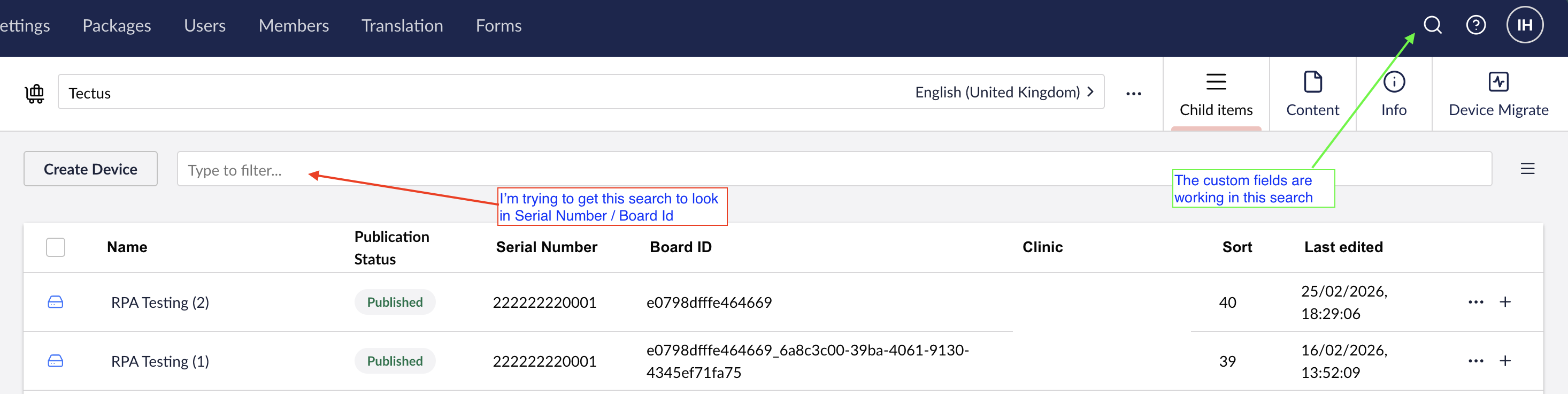
I’ve created a custom UmbracoTreeSearcherFields class to add some extra fields into the backoffice search functionality. The search doesn’t seem to be using them, so I added some extra logging into the class, but I can’t see this either.
Have I setup the new fields correctly, and is this the correct way to register it?
My composer:
builder.Services.AddUnique<IUmbracoTreeSearcherFields, CustomUmbracoTreeSearcherFields>();
My class:
public class CustomUmbracoTreeSearcherFields : UmbracoTreeSearcherFields, IUmbracoTreeSearcherFields
    {
        private readonly ILogger<CustomUmbracoTreeSearcherFields> _logger;
        private readonly IServiceScopeFactory _serviceScopeFactory;

        public CustomUmbracoTreeSearcherFields(
            ILogger<CustomUmbracoTreeSearcherFields> logger,
            ILocalizationService localizationService,
            IServiceScopeFactory serviceScopeFactory) : base(localizationService)
        {
            _logger = logger;
            _serviceScopeFactory = serviceScopeFactory;
            _logger.LogWarning("CustomUmbracoTreeSearcherFields instantiated");
        }

        public override IEnumerable<string> GetBackOfficeDocumentFields()
        {
            _logger.LogInformation("Getting backOffice document fields");

            var fields = base.GetBackOfficeDocumentFields().ToList();

            using var scope = _serviceScopeFactory.CreateScope();
            var publishedContentTypeCache = scope.ServiceProvider.GetRequiredService<IPublishedContentTypeCache>();

            fields.Add($"{Constants.Examine.Searchable}_{Constants.Examine.Index.UniqueMemberId}");
            fields.Add($"{Constants.Examine.Searchable}_{Constants.Examine.Index.MemberGuid}");

            fields.Add(Device.GetModelPropertyType(publishedContentTypeCache, x => x.UniqueBoardID).Alias);
            fields.Add(Device.GetModelPropertyType(publishedContentTypeCache, x => x.SerialNumber).Alias);

            fields.Add(GaitSession.GetModelPropertyType(publishedContentTypeCache, x => x.DeviceSerialNumber).Alias);
            fields.Add(GaitSession.GetModelPropertyType(publishedContentTypeCache, x => x.SessionName).Alias);

            foreach (var field in fields)
            {
                _logger.LogInformation("Added field to search: {Field}", field);
            }

            return fields;
        }

        //Adding custom field to search in members
        public override IEnumerable<string> GetBackOfficeMembersFields()
        {
            var fields = base.GetBackOfficeMembersFields().ToList();

            using var scope = _serviceScopeFactory.CreateScope();
            var publishedContentTypeCache = scope.ServiceProvider.GetRequiredService<IPublishedContentTypeCache>();

            fields.Add(VirtualMember.GetModelPropertyType(publishedContentTypeCache, x => x.MemberId).Alias);

            return fields;
        }
    }