Cannot render html inside a LIT element using override render()

Hello,

I am trying to recreate a custom property in Umbraco 17 using typescript. I have the component working in Umbraco 13 using Angular.

The issue I have at the moment is I cannot render the html I get back from my API call. either in the override render() on in the template I created. I can render text though :/.

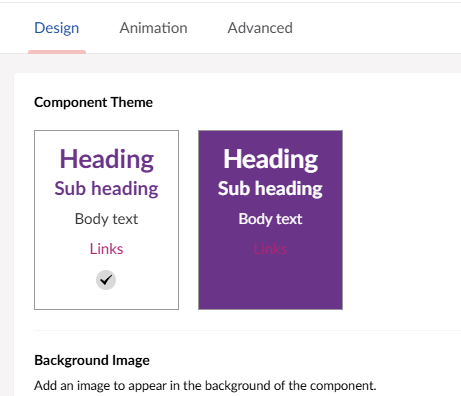
Umbraco 13 example

I have added the class that extends the LitElement and the ButtonTemplate class.

Hopefully someone can help, if you need anything else please let me know. I would be very grateful for any ideas :smiley:

LitElement

import type { UmbPropertyEditorUiElement } from '@umbraco-cms/backoffice/property-editor';
import { LitElement, customElement, html, property } from '@umbraco-cms/backoffice/external/lit';
import type { Settings } from './Settings';
import { http } from './Http';
import type { HttpResponse } from './HttpResponse';
import { ButtonTemplate } from './ButtonTemplate';

@customElement('my-suggestions-property-editor-ui')
export default class MySuggestionsPropertyEditorUIElement extends LitElement implements UmbPropertyEditorUiElement {

    public htmlButtonElement!: HTMLButtonElement;
    public button = '';
    constructor() {
        super();

        getHtmlButtonElement().then(settings => {
            this.htmlButtonElement = settings!;

            console.log(settings);
        });
    }

    @property({ type: String })
    public value = '';


    override render() {
        

        getHtmlButtonElement().then(settings => {
            this.htmlButtonElement = settings!;
            this.button = this.htmlButtonElement.innerHTML;

            
        });
   
        return html`<uui-button id="charlie" class="element charlie">${this.button}#help  </uui-button>`;
    }
}

async function getHtmlButtonElement() {

    let response: HttpResponse<Settings>;

    try {
        response = await http<Settings>("/Theme/ComponentSettings/");
        let settings = response.parsedBody!;
        if (!response.ok)
        { 
      throw new Error(`Error! status: ${response.status}`);
    }

        const button = document.createElement('button')!;
        console.log("1", response);
        const buttonTemplate = new ButtonTemplate(button);
        console.log("2", response);
        let container = buttonTemplate.render(settings);
        console.log("3", response);
        console.log("response", response);
        return container;

  } catch (response) {
        console.log("Error", response);
    }


}

declare global {
    interface HTMLElementTagNameMap {
        'my-suggestions-property-editor-ui': MySuggestionsPropertyEditorUIElement;
    }
}

ButtonTemplate.ts

import type { Settings } from './Settings';
export class ButtonTemplate {
    constructor(private container: HTMLButtonElement) { }

    render(items: Settings) {
        const button = document.createElement('button');
        const outerDiv = document.createElement('div');
        const pHeadingColor = document.createElement('p');
        const pSubHeadingColor = document.createElement('p');
        const pTextColor = document.createElement('p');
        const pOuterLinkColor = document.createElement('p');
        const spanLinkColour = document.createElement('span');

        pHeadingColor.innerText = 'Heading';
        pSubHeadingColor.innerText = 'Sub Heading';
        pTextColor.innerText = 'Body Text';
        spanLinkColour.innerText = 'Links';

        pOuterLinkColor.append(spanLinkColour);

        outerDiv.append(pHeadingColor);
        outerDiv.append(pSubHeadingColor);
        outerDiv.append(pTextColor);
        outerDiv.append(pOuterLinkColor);
        button.append(outerDiv);

        items.componentSettingsObjects.forEach(function (value) {
            console.log(value.id);
            pHeadingColor.innerText = value.id.toString();
        })

        outerDiv.append(pHeadingColor);
        button.append(outerDiv);
        this.container.append(button);

        return this.container;
    };
}

My first guess would be that getHtmlButtonElement() is async and I don’t think this works in the render() method, which is not async as far as I know.

I’d better of getting your data from the API at the connectCallback function and then rerender when the data is available.

Thanks @Luuk. Do you have an example of how this would work. If I override the connectCallback function, would I get the data and then return html? Or do I call update within the connectCallback function which calls the render function

Use @lit/task to do this. You install it through npm, and you should be able to render async data.

npm i --save @lit/task

Something like this:

import { Task } from '@lit/task';

import type { UmbPropertyEditorUiElement } from '@umbraco-cms/backoffice/property-editor';
import { LitElement, customElement, html, property } from '@umbraco-cms/backoffice/external/lit';
import type { Settings } from './Settings';
import { http } from './Http';
import type { HttpResponse } from './HttpResponse';
import { ButtonTemplate } from './ButtonTemplate';

@customElement('my-suggestions-property-editor-ui')
export default class MySuggestionsPropertyEditorUIElement extends LitElement implements UmbPropertyEditorUiElement {
	@property({ type: String })
	public value = '';

	private _buttonTask = new Task(this, {
		task: async ([value], { signal }) => {
			console.log('Received value', value);
			const response = await fetch(`/Theme/ComponentSettings/${value}`, { signal });
			if (!response.ok) {
				throw new Error(`Error! status: ${response.status}`);
			}

			const settings = await response.json();
			const button = document.createElement('button')!;
			console.log('1', response);
			const buttonTemplate = new ButtonTemplate(button);
			console.log('2', response);
			const container = buttonTemplate.render(settings);
			console.log('3', response);
			console.log('response', response);
			return container;
		},
		args: () => [this.value], // <-- Listening for this.value, but can also be empty to autorun with no value
	});

	override render() {
		return this._buttonTask.render({
			pending: () => html`<span>Loading...</span>`,
			error: (error: any) => html`<span>Error: ${error.message}</span>`,
			complete: (button: HTMLElement) => {
				return html`<uui-button id="charlie" class="element charlie">${button}#help </uui-button>`;
			},
		});
	}
}

declare global {
	interface HTMLElementTagNameMap {
		'my-suggestions-property-editor-ui': MySuggestionsPropertyEditorUIElement;
	}
}

I tried rewriting your component, but obviously, I do not know your business logic, so errors may occur. But try it out :slight_smile:

1 Like

Thanks so much @jacob I will give this a try. Really grateful :slight_smile:

Hi @charlesa-ccs

Notice the Lit Task helper makes it easier for you to await a promise and react when it’s fulfilled. Which can be a great help if you like that style of coding, so go ahead and use that solution.

I just wanted to add, looking at your initial code snippet, that it could hint that you haven’t fully comprehended how Lit works, so to help you with your future projects, I just wanted to focus a bit on how the render method of Lit works, which I think will help you next time.

The Lit render is executed every time Lit detects a change of the properties of the component. But not any property, only the properties that Lit is watching. To mark properties as reactive(once that Lit will watch) we use the @property & @state decorators.

You already use the @property one for value, so when the value is changed, the render will be exeucted.

In the above case, nothing triggers a render, for when the htmlButtonElement gets set. Simply the htmlButtonElement is not being watched by Lit. I would add a @state decorator on the property declaration. We use @state for internal properties and @property for public properties.

And once thats done, your render method will be executed when it changes. And then no need to call getHtmlButtonElement ()... etc. in your render method.

I hope that explanation helps you understand what is going on and moving forward with more custmozations, good luck.

Also notice you can read everything about lit here: Components overview – Lit

1 Like

Thanks @nielslyngsoe yes I am a beginner trying to learn :). I was trying to work out @property and @state were for.

Ok so If I have a public property of ‘name’ that uses @property and a private property of ‘htmlButtonElement’ that uses a @state. When either of these two values get changed the render method will be called and then when ever I am returning, in my case html with be re rendered on to the page?

When I select either one of the buttons, how do I store that property information to be used in code? For example I want to show this information on the front end of the website and need to know which button the user selected? I cannot see anything in the docs about this.

Hi @jacob , I have two errors, which I will try and fix. But if you have any ideas :confused:

Type TaskFunctionOptions is missing the following properties from type ‘AbortSignal’: aborted….

const response = await fetch(`/Theme/ComponentSettings/${value}`, { signal });

Type (‘error:Error) => TemplateResult<1> is not assignable to type ‘(error:unknown) => unknown’;

error: (error: Error) => html<span>Error: ${error.message}</span>,

Try not to type-cast the error:

error: (error: any) => html`<span>Error: ${error.message}</span>`,

Set the error to any to avoid type-cast errors.

Not sure about this error, but try without the signal if it keeps failing.

Thanks, its working and compiling now :D, so I think the first part is complete :smiley: . Do you know how I store which the user has selected?. In Angular I had to set the model value.

The replacement is to send out the “change” event. Check this tutorial out how they send the change event in the #onInput method:

The tutorial also shows you how to process the data on the server.

Thanks @jacob that’s the one I have been using, I will look again and see if I can find it :smiley:

Hi sorry one more question. If I create a method #onClick, how would this work given my html is created in a class called ButtonTemplate?.

What I am confused about is I need to, I think, is add an event to the onclick event of the button. Thus the . So that I can update value which calls the render method and the button the user clicked on in Umbraco is changed. But I cannot work out how I would add the event to the button? as the event needs to be in the MySuggestionsPropertyEditorUIElement class?

Is this correct and does that mean I cannot use the ButtonTemplate? I presume I am missing something :confused: ?

The only other way I can think of is to get the button and add an event listener in the constructor on the MySuggestionsPropertyEditorUIElement class and do it that way.

Change your task to return the JSON instead:

	private _buttonTask = new Task(this, {
		task: async ([value], { signal }) => {
			console.log('Received value', value);
			const response = await fetch(`/Theme/ComponentSettings/${value}`, { signal });
			if (!response.ok) {
				throw new Error(`Error! status: ${response.status}`);
			}

			const settings = await response.json();
			return settings;
		},
		args: () => [this.value], // <-- Listening for this.value, but can also be empty to autorun with no value
	});

Then change your render method to call the ButtonTemplate.render and add the onclick event with the id or whatever you need to save:

	override render() {
		return this._buttonTask.render({
			pending: () => html`<span>Loading...</span>`,
			error: (error: any) => html`<span>Error: ${error.message}</span>`,
			complete: (settings: Settings) => { // <-- Receives Settings instead
                const button = document.createElement('button');
                const buttonTemplate = new ButtonTemplate(button);
			    const container = buttonTemplate.render(settings);
				return html`<uui-button 
                  @click=${() => this.#onClick(settings.id)} // <-- add @click event with id of the selected button
                  id="charlie"
                  class="element charlie">
                    ${container}#help // <-- Render the container instead
                  </uui-button>`;
			},
		});
	}

Lastly, add an onclick method that stores the value and sends the event:

#onClick(buttonId: any) {
  this.value = buttonId;
  this.dispatchEvent(new UmbChangeEvent());
}

Thanks @jacob , now you have mentioned that you can imagine me face palming myself! :P. I don’t know how I did not notice this yesterday! Thanks so much again.

1 Like

All good, happy to help!

Ok maybe one more question :stuck_out_tongue:

So I see what you are saying here, however I am using a HtmlButtonElement. I have tried everything I can thing on. click, onclick, addEventListener to add the event to the HtmlButtonElement with no luck. I have also tried creating the html but that again did not work.

The ‘Settings’ object contains multiple ComponentSettingsObjects which contain the button information I need. The ‘Settings’ object is just a wrapper.

Inside the ButtonTemplate I am doing a foreach

items.componentSettingsObjects.forEach((value) => {} which returns all the html I need. X number of Buttons.

I hope that makes some sense. I can post code if its easier to understand

suggestions-property-editor-ui.element.ts

import { Task } from '@lit/task';
import type { UmbPropertyEditorUiElement } from '@umbraco-cms/backoffice/property-editor';
import { LitElement, customElement, html, property } from '@umbraco-cms/backoffice/external/lit';
import { ButtonTemplate } from './ButtonTemplate';
import type { Settings } from './Settings';
import { UmbChangeEvent } from '@umbraco-cms/backoffice/event';


@customElement('suggestions-property-editor-ui.element')
export default class MySuggestionsPropertyEditorUIElement extends LitElement implements UmbPropertyEditorUiElement {

    @property({ type: String })
    public value = '';

    private _buttonTask = new Task(this, {
        task: async (value) => {

            const response = await fetch(`/Theme/ComponentSettings/${value}`);

            if (!response.ok) {
                throw new Error(`Error! status: ${response.status}`);
            }


            const settings = await response.json() as Settings;
            return settings;
        },

        args: () => [this.value], // <-- Listening for this.value, but can also be empty to autorun with no value
    });

    #onClick(buttonId: any) {
        this.value = buttonId;
        this.dispatchEvent(new UmbChangeEvent());
    }

    override render() {
        return this._buttonTask.render({
            pending: () => html`<span>Loading...</span>`,
            complete: (settings: Settings) => {
                const htmlElement = document.createElement('div');
                htmlElement.className = "ccs-component-colour-swatch";
                const buttonTemplate = new ButtonTemplate(htmlElement);
                const container = buttonTemplate.render(settings);
                return html`${container}`;
            },
            error: (error: any) => html`<span>Error: ${error.message}</span>`,
        });
    }
}

declare global {
    interface HTMLElementTagNameMap {
        'my-suggestions-property-editor-ui': MySuggestionsPropertyEditorUIElement;
    }
}

ButtonTemplate.ts

import type { Settings } from './Settings';
import { UUIButtonElement } from '@umbraco-cms/backoffice/external/uui';
export class ButtonTemplate {
    constructor(private container: HTMLDivElement) { }


    render(items: Settings) {

        let outerButtonElement!: UUIButtonElement;
        items.componentSettingsObjects.forEach((item) => {
            outerButtonElement = document.createElement('uui-button');
            outerButtonElement.type = "button";
            outerButtonElement.style.backgroundColor = item.backgroundColor;

            const outerDivElement = document.createElement('div');
            const pHeadingColor = document.createElement('p');
            const pSubHeadingColor = document.createElement('p');
            const pTextColor = document.createElement('p');
            const pOuterLinkColor = document.createElement('p');
            const spanLinkColour = document.createElement('span');

            pHeadingColor.innerText = 'Heading';
            pHeadingColor.style.color = item.headingColor;
            pHeadingColor.style.fontWeight = "bold";

            pSubHeadingColor.innerText = 'Sub Heading';
            pSubHeadingColor.style.color = item.subHeadingColor;
            pSubHeadingColor.style.fontWeight = "bold";

            pTextColor.innerText = 'Body Text';
            pTextColor.style.color = item.textColor;
            pOuterLinkColor.append(spanLinkColour);

            outerDivElement.append(pHeadingColor);
            outerDivElement.append(pSubHeadingColor);
            outerDivElement.append(pTextColor);
            outerDivElement.append(pOuterLinkColor);
            outerButtonElement.append(outerDivElement);
            this.container.append(outerButtonElement);
        });

        return this.container;
    };
}

Settings.ts

import type { ComponentSettingsObjects } from "./ComponentSettingsObjects";

export interface Settings {
    componentSettingsObjects: ComponentSettingsObjects[];
}

You could always build the ButtonTemplate in the property editor itself, but since you are already in the deep end, you can forward the onClick method to your ButtonTemplate:

            complete: (settings: Settings) => {
                const htmlElement = document.createElement('div');
                htmlElement.className = "ccs-component-colour-swatch";
                const buttonTemplate = new ButtonTemplate(htmlElement);
                const container = buttonTemplate.render(settings, this.#onClick);
                return html`${container}`;
            },

Then bind a click listener to that:

render(items: Settings, callback: any) {

  let outerButtonElement!: UUIButtonElement;
  items.componentSettingsObjects.forEach((item) => {
    outerButtonElement = document.createElement('uui-button');
    outerButtonElement.addEventListener('click', () => callback(item.id)); // <-- Set an event listener and call the callback with an id or something else
  });
}

Also, you should consider constructing a LitTemplateResult in the ButtonTemplate like you do in the property editor. Something like this could do it:

render(items: Settings, callback: any) {
  return repeat(
    items.componentSettingsObjects,
    item => html`
      <uui-button @click=${() => callback(item.id)} type="button" style=${styleMap({ backgroundColor: item.backgroundColor })}>
        <div>
          <p style=${styleMap({ color: item.headingColor, fontWeight: 'bold' }) }>Heading</p>
          <p style=${styleMap({ color: item.subHeadingColor, fontWeight: 'bold' }) }>Sub Heading</p>
          <p>Body text</p>
      </uui-button>
    `
  );
}

Note, I’m missing a few p and span elements, but you see how you bind the @click listener dynamically here.

1 Like

Yep, ‘already in the deep end’, I feel more like in the middle of the ocean :’). Would have been easier to build in the ButtonTemplate.

Thanks for this, I will go through and understand what is happening and how it fits together.

I love this as well by the way, it’s so much neater and simpler. Good to know as i have more to do in the future :slight_smile:

return repeat( items.componentSettingsObjects, item => html``);

The good news @jacob :’), is that your code is brilliant and works perfectly :D. Slightly less good news is that ‘this’ in the call back in null, which I have a feeling you may say is terminal and ‘build the ButtonTemplate in the property editor itself’