Can you customise the members section listview in umbraco 17?

hey out there,

i’m interested to know if you can you customise the members section listview in umbraco 17?

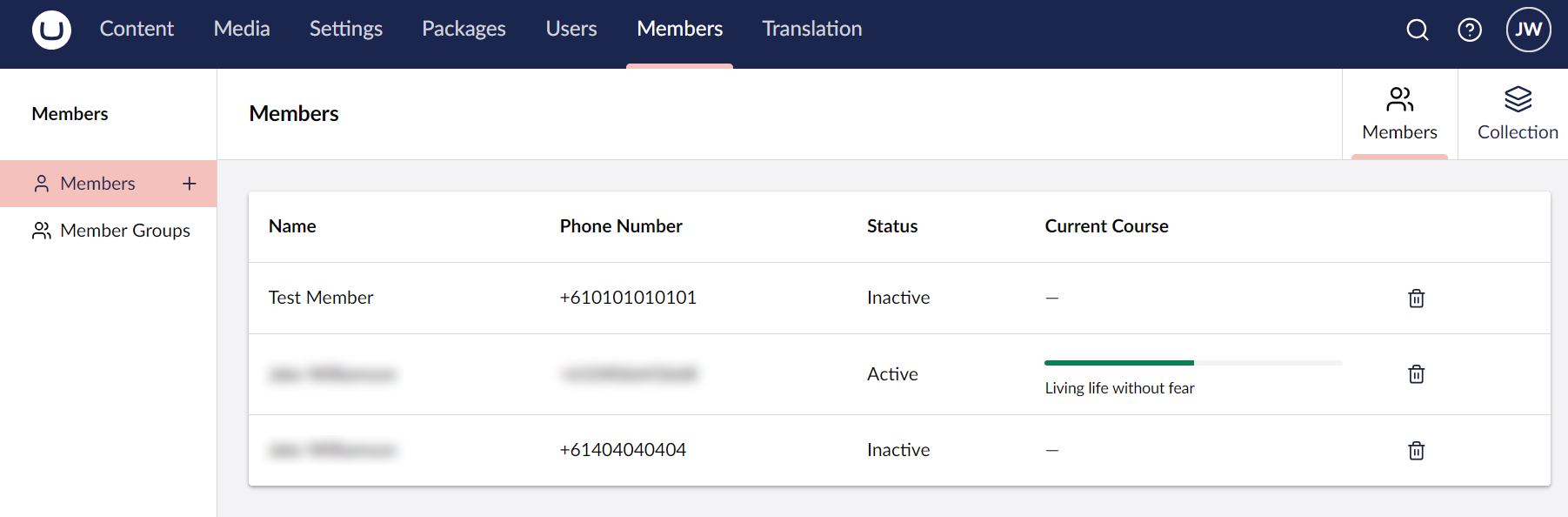
i need to add a couple of columns, one that has a string property and a 2nd that has custom markup for a progress bar.

my brain is telling me i could achieve this in one of two ways:

option 1: completely replace the current list view with my own one
pros: complete control over the markup and api call to get the member data
cons: kinda sucks as i’d need to replicate all the existing functionality…

option 2: add columns to the existing list view
pros: uses the existing list view
cons: from what i can tell, i’d need to add calculated properties to the member for the custom columns to be able to access the data, otherwise each row would make an api call (tbh this isn’t a massive deal, i can add them to a ‘developer’ group on the member as labels and the client will ignore them).

i gave option 1 a go, and got quite a way with it but the major thing i ran into was try as i might, i couldn’t get the original ‘collection’ to go away!
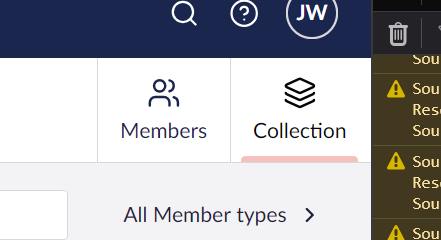
(‘Members’ was the new one, ‘Collection’ shows the core one)

its painful as the client would see two list views that are virtually identical which isn’t ideal. also replicating all the functionality from the core ‘collection’ just seems like a waste of time?

so i gave option 2 a go and ran into all sorts of problems, mainly getting the column to register in my mainigest.ts file:

export const manifests: Array<UmbExtensionManifest> = [
  {
    type: "ufmFilter",
    alias: "My.UfmFilter.DateFormat",
    name: "Date Format UFM Filter",
    api: () => import("./date-format.filter"),
    meta: {
      alias: "dateFormat",
    },
  },
  {
    type: "workspaceViewColumn",
    alias: "My.MemberColumn.Status",
    name: "Member Status",
    elementName: "my-member-status-column",
    js: () => import("./member-status-column.js"),
    meta: {
      label: "Status",
      indexPath: "values",
    },
    conditions: [
      {
        alias: "Umb.Condition.WorkspaceAlias",
        match: "Umb.Workspace.Member",
      },
    ],
  },
];

the ufmFilter one (thank you joe glombek :sign_of_the_horns: @glombek Umbraco Flavored Markdown: A ${template} for success - 24 Days In Umbraco) is working fine, but the workspaceViewColumn one throws this error:

Object literal may only specify known properties, and ‘elementName’ does not exist in type ‘ManifestBase’.

try as i might, i just can’t find a way around that…

so my question is, am i approaching this correctly or getting it completely wrong?! am i going to have to admit defeat, accept that option 1 is the only way to go and live with the ‘collection’ still being visiable?

any suggestions and/or pointers would be really appreciated :wink:

I’m glad you found my article useful!

Is workspaceViewColumn a valid extension point? I can’t see it documented anywhere. It’s also worth noting that List Views (these are called collection views in newer Umbraco versions) are different to Workspace Views, so I’d look at trying to replace the collection view rather than add a new workspace view, if you go down that route.

You can choose which columns to show in the collection view . These columns can have custom templates which means you could register a UFM Component to render the progress bar (so long as you have a single property value that’s used to calculate the progress, or use the ID and the UFM Component could call an API endpoint passing the ID).

Alternatively, I’m wondering what the CollectionView extension type is for? If this is for rendering collection views (seems logical!) then that could be useful but I can’t seem to find any further details. Collection View | CMS | Umbraco Documentation

Let us know how you get on, on the forum or in a blog post! All these extension points are new to us all so we all have a lot to learn! It’s also possible not everything is in place yet, so you may need to make some bug reports/feature requests.

1 Like

hey joe, you’re article was a great starting point and that date filter is really useful - thank you for posting :wink:

we’ve not made a great deal of progress on this, apart from finding out from the core team that adding columns isn’t currently possible….

what we’ve achieved so far is this:

this talks to its own api endpoint and is completely isolated from the core collection.

the challenge we have is that as we’ve now building from scratch, we’ve got to replicate all the functionality provided by the core collection! not idea as realistically, we’re doing a lot of work to simply add two columns…

try as we might, we also just can’t get our collection to replace the core one! i’m sure it must be an alias problem or something like that but we can’t get it to work…

so the approach we’re taking at the moment is to build our own dashboards. it means the code is completely isolated and not ‘stepping on the toes’ of the core code which so far, is making it a little easier.

i’ll post again once i have some more info :+1:

p.s. hows bristol?! i used to work at gibe digital back in the day before moving to australia. do you catch up with that crew at the meetups and the spark event?

I ran into the same issue not too long ago.

Looking at the umb-member-table-collection-view Web Component in the source code, the setup appears to be a bit hardcoded, so it’s probably difficult to extend or customize.

async #createTableItems(members: Array<UmbMemberCollectionModel>) {
  const memberTypeUniques = members.map((member) => member.memberType.unique);
  const { data: memberTypes } = await this.#memberTypeItemRepository.requestItems(memberTypeUniques);

  this._tableItems = members.map((member) => {
   // TODO: get correct variant name
   const name = member.variants[0].name;
   const kind =
    member.kind === UmbMemberKind.API
     ? this.localize.term('member_memberKindApi')
     : this.localize.term('member_memberKindDefault');

   const memberType = memberTypes?.find((type) => type.unique === member.memberType.unique);

   return {
    id: member.unique,
    icon: memberType?.icon,
    data: [
     {
      columnAlias: 'memberName',
      value: html`<a href=${'section/member-management/workspace/member/edit/' + member.unique}>${name}</a>`,
     },
     {
      columnAlias: 'memberUsername',
      value: member.username,
     },
     {
      columnAlias: 'memberEmail',
      value: member.email,
     },
     {
      columnAlias: 'memberType',
      value: memberType?.name,
     },
     {
      columnAlias: 'memberKind',
      value: kind,
     },
     {
      columnAlias: 'entityActions',
      value: html`<umb-entity-actions-table-column-view
       .value=${{
        entityType: member.entityType,
        unique: member.unique,
        name: member.variants[0].name,
       }}></umb-entity-actions-table-column-view>`,
     },
    ],
   };
  });
}

I considered creating a feature request to make it possible to use a collection view for this in the future, but haven’t got around to it yet. :slightly_smiling_face:

Hopefully you can get a better conclusion in the future than me.:crossed_fingers:

hey @dsm-twoday thank you for taking the time to reply, really appreciate it :wink:

it’s a weird one, i’ve been racking my brain as i know i’ve seen the ability to control the columns before…

i actually got to the point where i fired up an old v8 project to check it out and yes, the members list view datatype allows you to control the column output in the members section! it alway struck me as a weird set up back in the day but it kinda worked.

interestingly, the media folder still works in the same way in v17, it’s just that it’s been removed for the members - weird hey?!

at the moment, we’ve gone with a custom dashboard to achieve what were after but the code could be totally transferable to the members section if we can figure out how to replicate the wrapper functionality that already exists.

your code sample posted here has really helped, as it’s put me onto where that table view actually exists in the core and how they’ve coded it up (it’s different to how i’ve done it!).

i think if i can backtrack from the `src\Umbraco.Web.UI.Client\src\packages\members\member\collection\views\table\member-table-collection-view.element.ts` file i can effectively recreate the members table view and manipulate it to our clients needs.

but the main thing that bugs me about that is we’re going a very long way round to literally add a couple of columns to a piece of core code that already exists… which feels like a lot of work for not a huge amount of benefit :sad_but_relieved_face:

but i am learning a lot of stuff along the way - so maybe it’s worth the effort?!