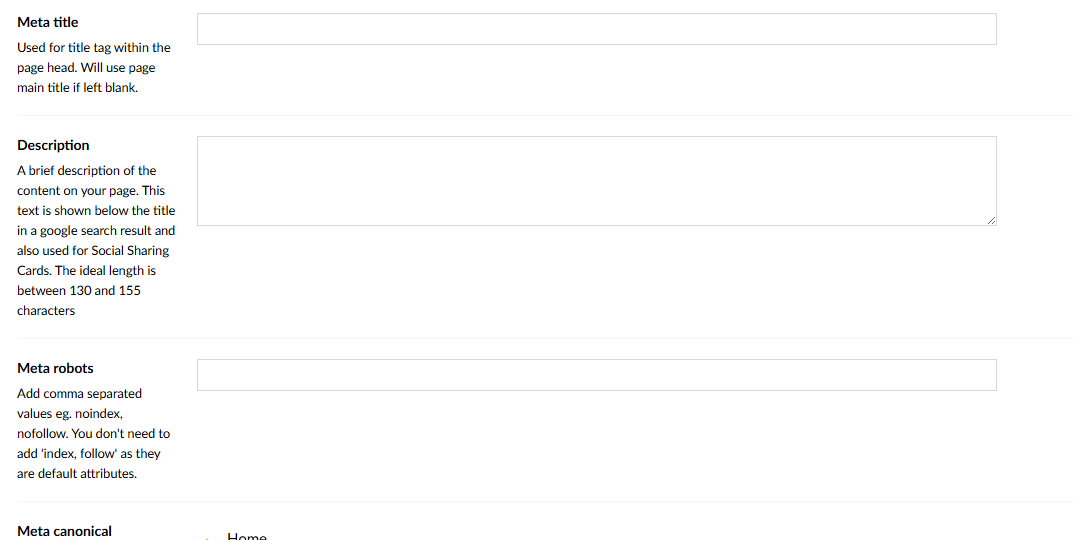
What’s the best way to update meta titles and descriptions across a large number of pages?
Each page currently has its own meta section, but updating around 200 pages manually would be very time-consuming. Is there a more efficient way to handle this, for example via an Excel upload?
I’ve been looking into SEO Toolkit but I’m not quite sure how it could help with bulk updates in this case. Any guidance or recommendations would be appreciated.
Yeah, I think you’ll probably be looking at having to code something yourself to update all of these items. SeoToolkit also doesn’t have anything out of the box for this, but I might be able to make something for you.
Also just wondering, but why do you want to update so many pages manually all at once? Is it because they are all empty?
Here is one way to get started. Retrieve the pages you need to update by the type then update the fields. The below code does require some amendments for your project/structure but here to get you started.
using Umbraco.Cms.Core.Services;
using Umbraco.Cms.Infrastructure.Scoping;

public class MetaUpdaterService
{
    private readonly IContentService _contentService;
    private readonly IContentTypeService _contentTypeService;
    private readonly IScopeProvider _scopeProvider;

    public MetaUpdaterService(
        IContentService contentService,
        IContentTypeService contentTypeService,
        IScopeProvider scopeProvider)
    {
        _contentService = contentService;
        _contentTypeService = contentTypeService;
        _scopeProvider = scopeProvider;
    }

    public void UpdateMetaProperties()
    {
        using (var scope = _scopeProvider.CreateScope())
        {
            // Get the content type by alias
            var contentType = _contentTypeService.Get("myPageType");
            if (contentType == null)
                throw new InvalidOperationException("Content type not found");

            // Get all content items of this type
            var allPages = _contentService.GetPagedOfType(
                contentType.Id,
                pageIndex: 0,
                pageSize: int.MaxValue,
                totalRecords: out long totalRecords,
                null);

            foreach (var page in allPages)
            {
                var newTitle = $"Meta Title for {page.Name}";
                var newDescription = $"This is the meta description for {page.Name}.";

                // Use your property aliases here
                page.SetValue("title", newTitle);
                page.SetValue("description", newDescription);

                _contentService.SaveAndPublish(page);
            }

            scope.Complete();
        }
    }
}
You may want to first comment out _contentService.SaveAndPublish(page); so you can review what its doing in debug mode before you commit the changes.
Following this you could get data from an Excel sheet and perhaps pass it in as a parameter and use whatever logic you need to the map the data (if applicable) and then continue to update the values as required.
This code would need tweaking for large number of pages but should suffice for one off operations depending on requirements.
I think you’d be looking at the paid version for updates.. and need to have a primarykey field in the cms to map from the primary key in your datasource..
Though as you only have a small subset of fields, should be reasonably straight forward to follow @EssCee exmple..
The metaTitle already seems to indicate it has a fallback to page main title, and presumably also to the nodename if that is empty too.. you could do the same for others.. if the description could also be generated from other fields, eg first paragraph from a content rte/blocklist(grid)??
You could also have a fallback to ancestors, to grab a common default for all pages in a section.. (prob more suitable for the robots)
Might be better than empty content, if that’s what’s showing, and then give you more time to manually process your 200 items over a few days?
I’ve used a similar pattern before: fetch content by type via IContentService, update the SEO properties, and save/publish in a controlled scope.
If Excel is involved, you can read it into a dictionary (e.g. by node ID, key, or URL) and map meta title/description per page before updating. For safety, I’d also recommend running it first as Save only (no publish) or on a limited page set to validate the mappings.
Sorry I might have got the wrong end of the stick here…
I read it as this is the Umbraco CMS setup, ready to receive a set of data from another system (previous site, csv, excel spread sheet) (and here’s what that data looks like)
So I guess the question remains where are you getting the SEO data from?
You mention you might be able to go excel upload… but is that you still generating new SEO content?
If so then I don’t think you’ll find it’s any quicker to have to generate and then import as opposed to manually just visit the 200 pages.
The only way I think you’ll save by having some sort of import is if you already have the SEO content elsewhere.
I think we are still on the same page but off slightly
The screen shot is the umbraco cms view, each page has that setting field.
I plan to create an excel file with values matching the fields particularly the description field.