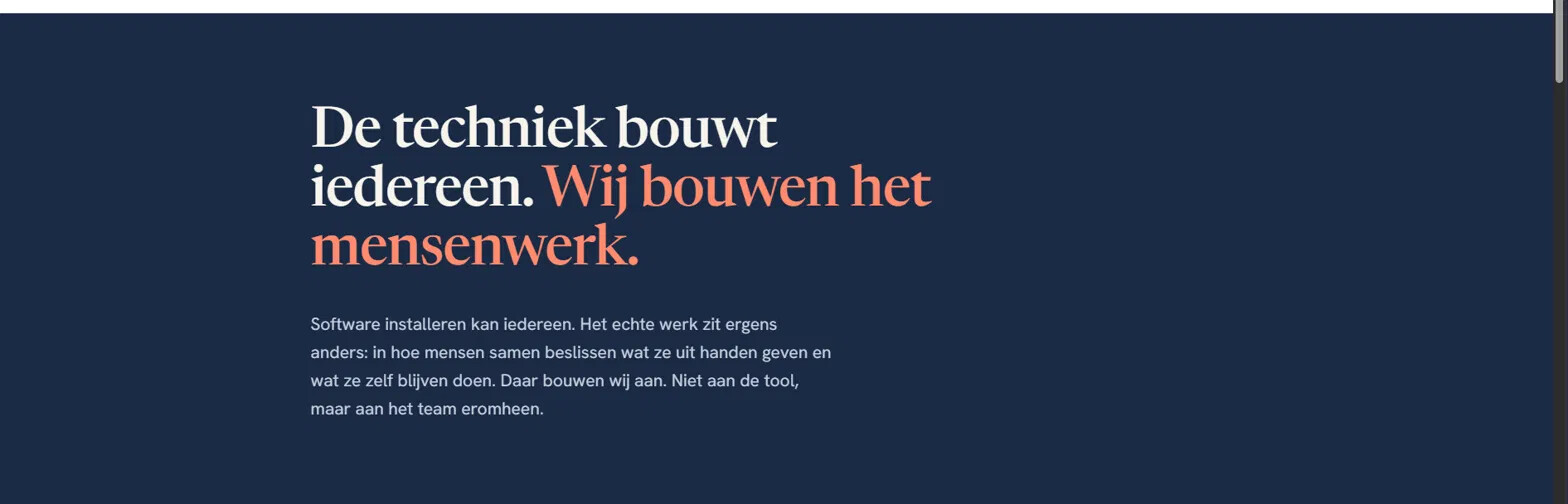
I’m building a Block List block for a hero section (see screenshot below) where the heading has two colors most of it default, with a highlighted phrase in an accent color:
“De techniek bouwt iedereen. Wij bouwen het mensenwerk.”
What’s the recommended/standard way to model this in Umbraco so it stays easy for non-technical editors to use, without giving them a full color picker or requiring them to write HTML?
I think it depends how flexible this needs to be. Personally, I would split this into two text inputs, one for the first part of the title/heading and another for the accent part. That way the editors can’t really mess it up or get it wrong. Just output them together using a span on the second text to change the colour using CSS.
The accent part could be optional and you could provide a list of available brand colours if required.
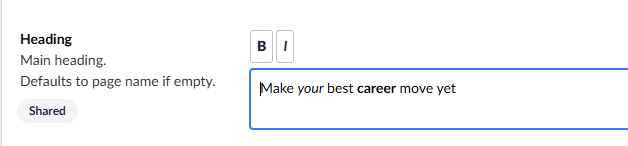
I would steer clear of using an RTE for this as it would introduce other issues and allow more markup in the heading than you want to allow.
Doing the exact same thing as @justin-nevitech has described this very afternoon.
In the past i’ve used some custom (magic-string like) pattern matching but for a one-off color splash where it wasn’t expected to be authored often (if ever again post launch date) though I wouldn’t expect it would pass the important consideration of “That way the editors can’t really mess it up or get it wrong.” in the same way that the two field option handles.
You could also go with a markdown approach using a regular text input. Let the user write De techniek bouwt iedereen. **Wij bouwen het mensenwerk** and then use a markdown library to parse it (or just regex), and style acorrdingly.
Sørens solution above, is the solution that we’ve been using so many times; it’s usually easy for the editors to get a hang of, and it doesn’t “bake” the color in (we always phrase it as emphasis that - in their current design - happens to be styled by altering the color).
Thanks @everyone for the input, really helpful thread!
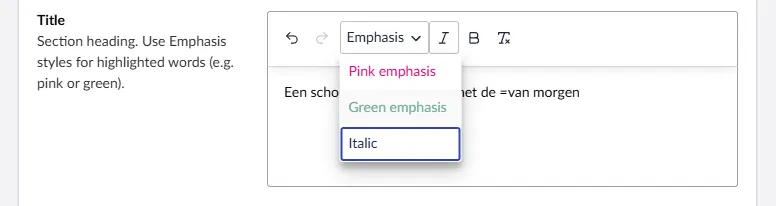
I ended up going with something close to what @skttl and @greystate described, an “emphasis” concept rather than a raw color picker, but implemented (in progress ) it via a custom RTE toolbar I added a limited “Emphasis” dropdown to the RTE (screenshot attached) with predefined options like “Pink emphasis” and “Green emphasis”, each mapping to a fixed CSS class/color defined in the front end. Editors just select the word/phrase they want to highlight and apply the style, no HTML knowledge needed, no free color choice, and it can’t break the design system.
Like @greystate said, framing it as “emphasis” rather than “color” keeps it flexible if the design changes later, since it’s not baking a literal color into the content, just a semantic style.
Feels like a nice middle ground between the two-field approach (very safe, but rigid only works for exactly one highlighted phrase) and full markdown/RTE freedom (flexible, but more editor error potential). This gives inline flexibility (highlight any word/phrase, multiple if needed) while staying locked to approved styles.
As much as that is a nice solution, my only comment would be that the RTE editor wraps its content in a p tag by default, so if you output that value straight into your heading tag you will end up with a p nested inside the heading, which is technically not valid markup.
Easiest fix is to strip the wrapping p on output and add the heading tag yourself, leaving just your inline emphasis marks inside. Are you already handling that when you render it?
We handle that on the render side: when we output a title field into a heading (<h1>, <h2>, etc.), we strip the outer <p> / </p> and only render the inline markup inside the heading. Editors still use the Emphasis toolbar in the backoffice; the frontend outputs something like:
This is actually pretty great now that the TipTap editor allows strict control of what gets saved/copied in that RTE. I would not have trusted the old RTE as it would have been possible for somebody to copy in another <h1> and other nasty markup… simply too much to defend against. TipTap is a real boost in being able to provide more flexible authoring options whilst not opening up potential nightmares. --great reminder that v17 presents lots of opportunity to reconsider past avoidances.
 ) it via a custom RTE toolbar I added a limited “Emphasis” dropdown to the RTE (screenshot attached) with predefined options like “Pink emphasis” and “Green emphasis”, each mapping to a fixed CSS class/color defined in the front end. Editors just select the word/phrase they want to highlight and apply the style, no HTML knowledge needed, no free color choice, and it can’t break the design system.