Hi all, I have a very critical issue to raise regarding backoffice external login in version 17.
So the documentation says that we have to enable basic authentication settings to override the login page with a custom one that has an external SSO login button :
Without this setting, the browser shows a native authentication pop-up that does not support external login providers.
However, the dedicated documentation for the Basic Authentication specifically mentioned that these settings will restrict the frontend pages with backoffice user credentials. Quoted from the doc:
Basic authentication protects the front-end of your Umbraco website using backoffice user credentials. When enabled, visitors must authenticate before accessing any page.
My application has this basic auth enabled because it uses Microsoft Entra ID as an external login for backoffice users. So the problem I’m having right now is that since that setting automatically restricts frontend pages even though my application doesn’t implement any explicit restriction to the frontend pages (e.g: Decorate CustomRenderController with an Authorize attribute), any request to the frontend pages will be redirected to the backoffice login page - which is NOT ideal. That said, any frontend users who don’t have a backoffice user credential will not be able to access the frontend pages.
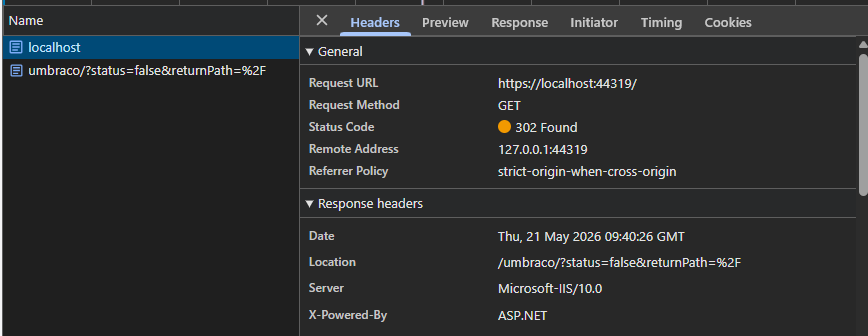
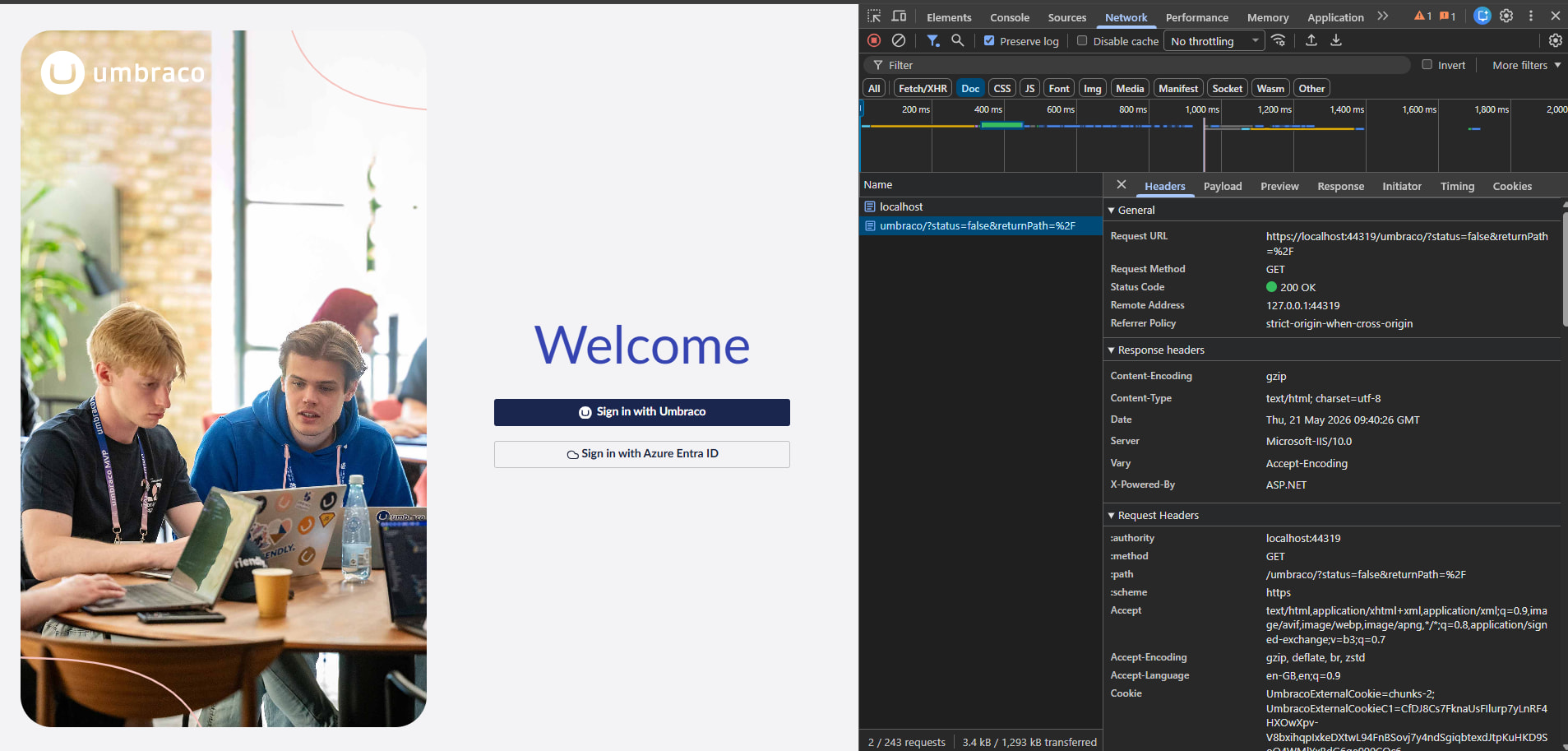
As you can see the request to the homepage below, it returns a 302 and gets redirected to /umbraco/?status=false&returnPath=%2F straight away.
This is all caused by the Basic Authentication setting. If this setting is in place, the SSO login for backoffice users works fine, but it will also unnecessarily restrict the frontend pages. However, without this setting, the frontend pages work as normal, but it will break the backoffice SSO login.
Please tell me I’m wrong or I have missed a configuration or anything because otherwise this is a CRITICAL bug from Umbraco.
You don’t need BasicAuth enabled as this will protected your entire site, including your front end. You just need to setup and configure the SSO for back office users as per the documentation further down the page you mention.
In Entra, register the app and add a redirect URI ending in your chosen callback path (here /umbraco-entra-signin) for each environment, e.g. https://yoursite.com/umbraco-entra-signin. Grab the Client ID, Tenant ID, and a client secret.
Then create the provider options class. This controls how the button appears and the auto-linking behaviour:
using Microsoft.AspNetCore.Authentication.OpenIdConnect;
using Microsoft.Extensions.Options;
using Umbraco.Cms.Core;
using Umbraco.Cms.Web.Common.Security;

namespace MyApp;

public class EntraBackOfficeExternalLoginProviderOptions
    : IConfigureNamedOptions<BackOfficeExternalLoginProviderOptions>
{
    public const string SchemeName = "Entra";

    public void Configure(string? name, BackOfficeExternalLoginProviderOptions options)
    {
        if (name != Constants.Security.BackOfficeExternalAuthenticationTypePrefix + SchemeName)
        {
            return;
        }
        Configure(options);
    }

    public void Configure(BackOfficeExternalLoginProviderOptions options)
    {
        // Shown on the login button: "Sign in with Entra ID"
        options.ButtonStyle = "primary";
        options.Icon = "icon-cloud";

        // Auto-link: create a backoffice user automatically on first SSO login
        options.AutoLinkOptions = new ExternalSignInAutoLinkOptions(
            autoLinkExternalAccount: true,
            defaultUserGroups: new[] { Constants.Security.EditorGroupAlias },
            defaultCulture: null,
            // Set true to forbid local username/password login for these users
            allowManualLinking: false
        )
        {
            OnAutoLinking = (autoLinkUser, loginInfo) =>
            {
                // Optionally inspect claims and adjust groups/roles here
            },
            OnExternalLogin = (user, loginInfo) =>
            {
                // Runs on every external login; return true to allow
                return true;
            }
        };

        // If true, users can ONLY log in via Entra (hides local login fields)
        options.DenyLocalLogin = false;

        // Redirect straight to Entra instead of showing the Umbraco login screen
        options.AutoRedirectLoginToExternalProvider = false;
    }
}
Then the registration extension. This is the part that registers the OIDC handler against the backoffice scheme:
using Microsoft.AspNetCore.Authentication.OpenIdConnect;
using Umbraco.Cms.Core.DependencyInjection;
using Umbraco.Extensions;

namespace MyApp;

public static class EntraBackOfficeAuthenticationExtensions
{
    public static IUmbracoBuilder AddEntraBackOfficeAuthentication(this IUmbracoBuilder builder)
    {
        builder.Services.ConfigureOptions<EntraBackOfficeExternalLoginProviderOptions>();

        builder.AddBackOfficeExternalLogins(logins =>
        {
            logins.AddBackOfficeLogin(backOfficeAuthenticationBuilder =>
            {
                // The scheme MUST be set with this helper to bind to the backoffice
                var schemeName = backOfficeAuthenticationBuilder.SchemeForBackOffice(
                    EntraBackOfficeExternalLoginProviderOptions.SchemeName);

                ArgumentNullException.ThrowIfNull(schemeName);

                backOfficeAuthenticationBuilder.AddOpenIdConnect(schemeName, options =>
                {
                    options.Authority = "https://login.microsoftonline.com/{TENANT_ID}/v2.0";
                    options.ClientId = "{CLIENT_ID}";
                    options.ClientSecret = "{CLIENT_SECRET}";
                    options.ResponseType = "code";

                    // Must match the redirect URI registered in Entra
                    options.CallbackPath = "/umbraco-entra-signin";

                    options.Scope.Add("openid");
                    options.Scope.Add("email");

                    options.SaveTokens = true;
                });
            });
        });

        return builder;
    }
}
My SSO configuration follows exactly from what was outlined in Umbraco documentation that you and I attached above - except I’m using AddMicrosoftAccount as its provider rather than AddOpenIdConnect (as suggested by your AI response), but I suppose changing this provider wouldn’t make any difference.
Anyway, as it turns out, the basic authentication setting I mentioned earlier can actually be removed (which already contradicts from the Umbraco documentation), and the reason the backoffice SSO login broke was that I was using a user that had been disabled in the CMS (because I want to test the frontend login). So technically the test was invalid.
In short, removing the BasicAuth setting should fix the issue now. Though, this statement from Umbraco still causing a confusion to me I reckon:
This redirects users to a standalone server-rendered login page where external provider buttons are displayed. Without this setting, the browser shows a native authentication popup that does not support external login providers.