skttl
December 5, 2025, 9:39am
1
When running a project locally with hot reload (dotnet watch), every time I do something, that updates a uda file (Umbraco Deploy), the backoffice gets a black overlay like this:
<div id="dotnet-compile-error" style="z-index:1000000; position:fixed; top: 0; left: 0; right: 0; bottom: 0; background-color: rgba(0,0,0,0.5); color:black; overflow: scroll;"></div>
I can see these messages in my terminal:
dotnet watch ⌚ File updated: .\umbraco\Deploy\Revision\document-type__2d4cae556d234718b91b340d75220a22.uda
dotnet watch ⌚ No C# changes to apply.
Anyone know how I can prevent that, while still running with hot reload?
skttl
December 5, 2025, 9:52am
3
Yup - was missing a v17 tag when creating the post
sebastiaan
December 5, 2025, 9:57am
5
It was right there all this time ..
First off, I never liked hot reload and I don’t trust it.. but that’s just my personal opinion!
But it looks like it MIGHT be fixed in an upcoming .NET release https://github.com/dotnet/sdk/issues/51825 - though not entirely sure this is the exact issue.
I think for now you could just ignore that folder, in your .csproj:
<ItemGroup>
  <Watch Remove="umbraco\Deploy\**\*.*" />
</ItemGroup>
skttl
December 5, 2025, 9:59am
6
Cool, I’ll wait for the .net update then
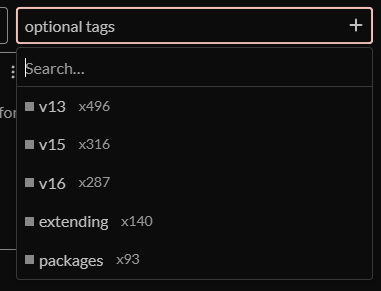
By the way - can we make the v17 tag more obvious?
skttl
December 5, 2025, 10:04am
7
Sebastiaan Janssen ⚓:
I think for now you could just ignore that folder, in your .csproj:
<ItemGroup>
  <Watch Remove="umbraco\Deploy\**\*.*" />
</ItemGroup>
I tried that and it didn’t work. I think it’s because the files aren’t there at build time (I think Deploy deletes the files, then creates them)
So I googled a bit, and found I could put them in DefaultItemExcludes like this:
	<PropertyGroup>
		<DefaultItemExcludes>$(DefaultItemExcludes);umbraco\Deploy\**\*.*</DefaultItemExcludes>
	</PropertyGroup>
This works
sebastiaan
December 5, 2025, 10:05am
8
It’s sorted by most used.. it will float to the top eventually.
I don’t think you should wait though, it doesn’t seem ENTIRELY related. Also, you really don’t need watchers on that folder, we should probably add a default ignore for some folders in the umbraco directory.
sebastiaan
December 5, 2025, 10:06am
9
Ooh nice one! Wonder what else should be in a default ignore..
system
January 4, 2026, 10:07am
10
This topic was automatically closed 30 days after the last reply. New replies are no longer allowed.