So I am trying to create my first package and am using the “Opinionated Umbraco Package Starter Template” to get started. Looking at the gitup the project has not been touched in over 5 months and is still meant for Umb 16 but when I follow the instructions and run the dotnet new command it installs the latest Umbraco 17. When I build and run the project I don’t see the example dashboard anywhere in the content area, just the normal Welcome to Umbraco and Redirect URL Manager dashbaords.
I don’t see any files with “NPM” in the name in the client folder. The test site is already on 17.1 That was the version installed when I ran the dotnet new command.
and the v17 umbraco package extension template no longer includes these build commands.. so you need to do manually..
So you have node.js version 22 or later? (as mentioned in the pre-requisites)
you need to open a terminal and navigate to the client folder, and then run the npm install and npm run build commands..
you should then see files generated in the www/app_plugings/{your plugin name} folder of the package project
also whilst you are developing, any changes and you need to npm run build again.. or you can npm run watch, to have it automatically do it on file changes in the client folder.
But I think you will have to touch a few things to move everything over to umb 17…
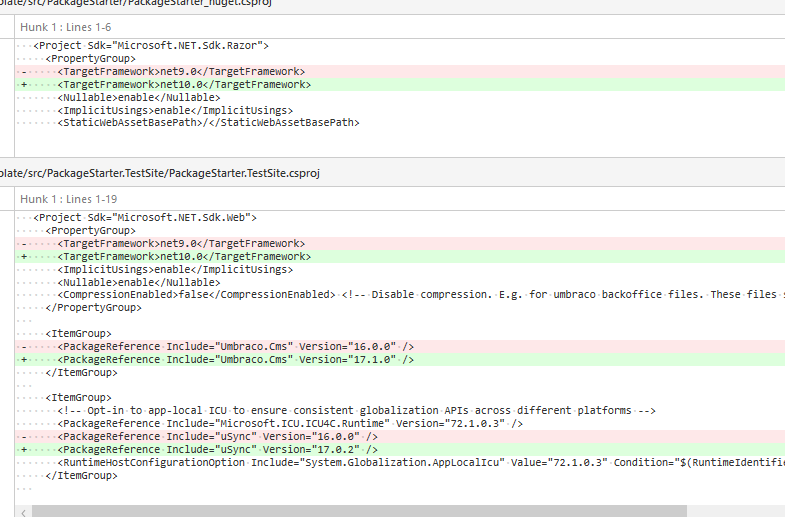
target framework will be 9, should be 10.. and the test site has a umb 16 dependency, not 17..
and uSync can be updated to 17.1.0 too…
Thabks for updating to v17 and updating the instrucions as well. I can attest that following the instructions now gets you a fully working base with no config changes or any errors.