Adding TipTap to a custom property editor?

Hi,
Ive been trying to add Tip-Tap to a custom property editor and I have had some success but what I’m struggling with is trying to get the toolbar to show. I’ve had a look around the CMS core code and spotted that it needed some config, which made sense, as you need to tell the toolbar what to show/hide. However, no matter what I try, I only ever get an empty text area with no tip-tap toolbar.

Here is my custom property element :

import { customElement, html } from '@umbraco-cms/backoffice/external/lit';
import { UmbLitElement } from '@umbraco-cms/backoffice/lit-element';
import type { UmbPropertyEditorUiElement } from '@umbraco-cms/backoffice/property-editor';
import {UmbPropertyEditorConfigCollection } from "@umbraco-cms/backoffice/property-editor";
import '@umbraco-cms/backoffice/tiptap';

@customElement('property-editor-custom-map-editor')
export class PropertyEditorCustomMapEditorElement extends UmbLitElement implements UmbPropertyEditorUiElement {

    private _configCollection = new UmbPropertyEditorConfigCollection([
        {
            alias: 'toolbar',
            value: [
                [
                    [
                        "Umb.Tiptap.Toolbar.SourceEditor",
                    ],
                    [
                        "Umb.Tiptap.Toolbar.TextAlignLeft",
                        "Umb.Tiptap.Toolbar.TextAlignCenter",
                        "Umb.Tiptap.Toolbar.TextAlignRight"
                    ],
                    [
                        "Umb.Tiptap.Toolbar.BulletList",
                        "Umb.Tiptap.Toolbar.OrderedList"
                    ],
                    [
                        "Umb.Tiptap.Toolbar.Link",
                        "Umb.Tiptap.Toolbar.Unlink"
                    ]
                ]
            ]
        }
    ]);

    render() {
        return html`
       <umb-property-editor-ui-tiptap>
      
        <umb-input-tiptap>
          <umb-tiptap-toolbar configuration="${this._configCollection}"  data-mark="tiptap-toolbar</umb-tiptap-toolbar>
        </umb-input-tiptap>
        </umb-property-editor-ui-tiptap>
    `;
    }
}
export { PropertyEditorCustomMapEditorElement as element };


declare global {
    interface HTMLElementTagNameMap {
        'property-editor-custom-map-editor': PropertyEditorCustomMapEditorElement;
    }
}

Which outputs :
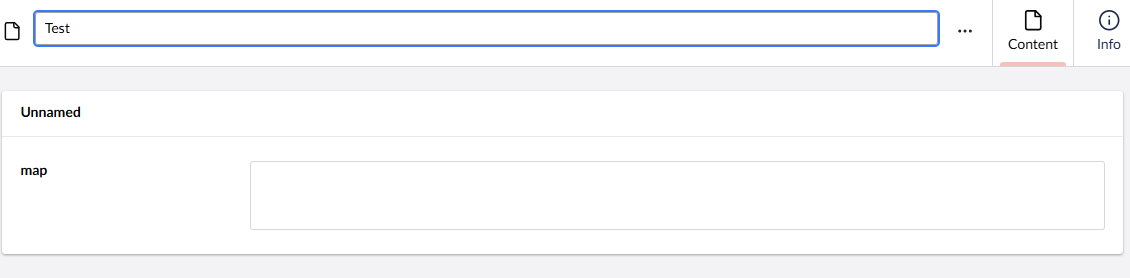
With no errors in the console.
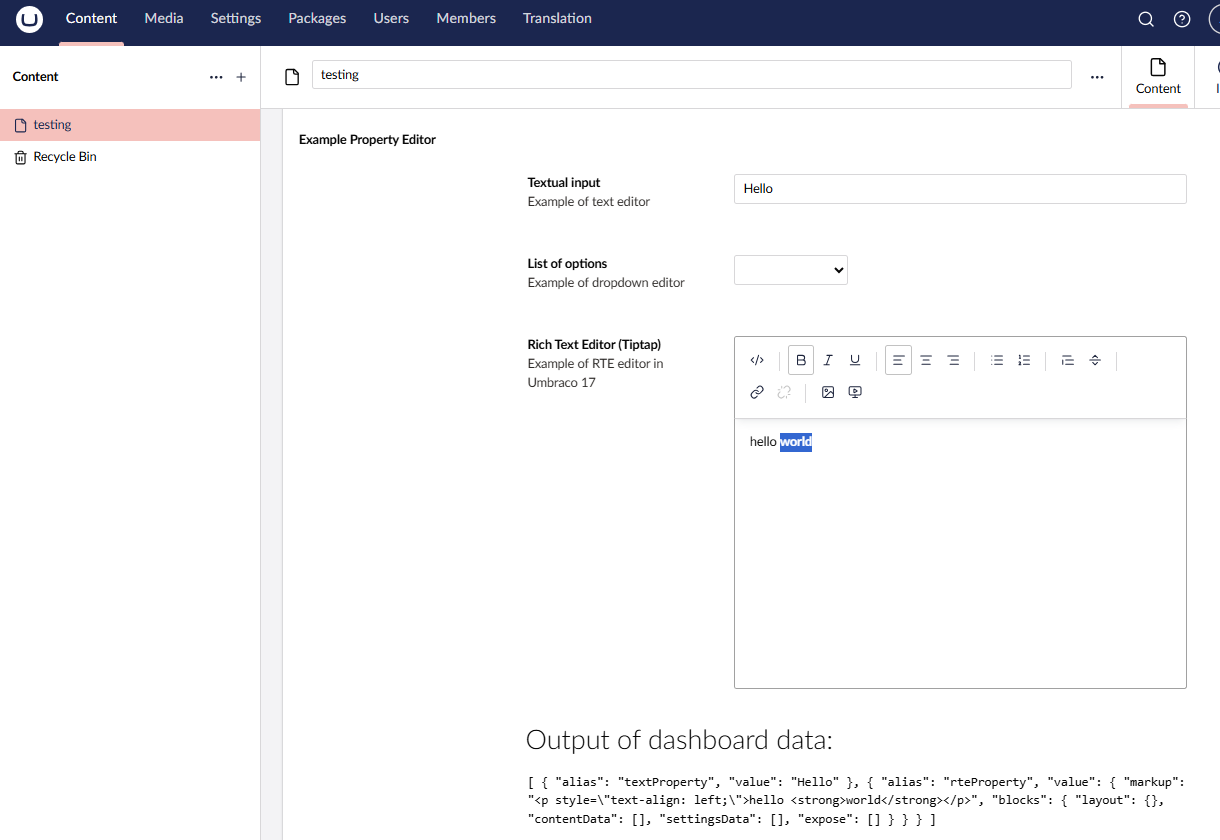
This looked interesting so with inspiration from
Umbraco-CMS/src/Umbraco.Web.UI.Client/examples/dashboard-with-property-dataset/dataset-dashboard.ts at main · umbraco/Umbraco-CMS
and
Umbraco-CMS/src/Umbraco.Web.UI.Client/src/packages/tiptap/property-editors/tiptap-rte/property-editor-ui-tiptap.stories.ts at main · umbraco/Umbraco-CMS

import { UmbTextStyles } from '@umbraco-cms/backoffice/style';
import { css, html, customElement, LitElement } from '@umbraco-cms/backoffice/external/lit';
import { UmbElementMixin } from '@umbraco-cms/backoffice/element-api';
import type { UmbPropertyValueData, UmbPropertyDatasetElement } from '@umbraco-cms/backoffice/property';
import { UmbPropertyEditorConfigCollection } from "@umbraco-cms/backoffice/property-editor";

@customElement('example-dataset-dashboard')
export class ExampleDatasetDashboard extends UmbElementMixin(LitElement) {
  data: UmbPropertyValueData[] = [
    {
      alias: 'textProperty',
      value: 'Hello',
    },
  ];

  #onDataChange(e: Event) {
    const oldValue = this.data;
    this.data = (e.target as UmbPropertyDatasetElement).value;
    this.requestUpdate('data', oldValue);
  }

  private _configCollection = new UmbPropertyEditorConfigCollection([
    {
      alias: 'hideLabel',
      value: true,
    },
    { alias: 'dimensions', value: { height: 300 } },
    { alias: 'maxImageSize', value: 500 },
    { alias: 'ignoreUserStartNodes', value: false },
    {
      alias: 'toolbar',
      value: [
        [
          ['Umb.Tiptap.Toolbar.SourceEditor'],
          ['Umb.Tiptap.Toolbar.Bold', 'Umb.Tiptap.Toolbar.Italic', 'Umb.Tiptap.Toolbar.Underline'],
          ['Umb.Tiptap.Toolbar.TextAlignLeft', 'Umb.Tiptap.Toolbar.TextAlignCenter', 'Umb.Tiptap.Toolbar.TextAlignRight'],
          ['Umb.Tiptap.Toolbar.BulletList', 'Umb.Tiptap.Toolbar.OrderedList'],
          ['Umb.Tiptap.Toolbar.Blockquote', 'Umb.Tiptap.Toolbar.HorizontalRule'],
          ['Umb.Tiptap.Toolbar.Link', 'Umb.Tiptap.Toolbar.Unlink'],
          ['Umb.Tiptap.Toolbar.MediaPicker', 'Umb.Tiptap.Toolbar.EmbeddedMedia'],
        ],
      ],
    },
    {
      alias: 'extensions',
      value: [
        'Umb.Tiptap.RichTextEssentials', 'Umb.Tiptap.Blockquote', 'Umb.Tiptap.Bold', 'Umb.Tiptap.BulletList', 'Umb.Tiptap.Embed', 'Umb.Tiptap.Figure', 'Umb.Tiptap.HorizontalRule', 'Umb.Tiptap.Image', 'Umb.Tiptap.Italic', 'Umb.Tiptap.Link', 'Umb.Tiptap.MediaUpload', 'Umb.Tiptap.OrderedList', 'Umb.Tiptap.Subscript', 'Umb.Tiptap.Superscript', 'Umb.Tiptap.TextAlign', 'Umb.Tiptap.Underline',
      ],
    },
  ]);

  override render() {
    return html`
				<umb-property-dataset .value=${this.data} @change=${this.#onDataChange}>
					<umb-property
						label="Textual input"
						description="Example of text editor"
						alias="textProperty"
						property-editor-ui-alias="Umb.PropertyEditorUi.TextBox"></umb-property>
					<umb-property
						label="List of options"
						description="Example of dropdown editor"
						alias="listProperty"
						.config=${[
        {
          alias: 'multiple',
          value: false,
        },
        {
          alias: 'items',
          value: ['First Option', 'Second Option', 'Third Option'],
        },
      ]}
						property-editor-ui-alias="Umb.PropertyEditorUi.Dropdown"></umb-property>
        <umb-property
          label="Rich Text Editor (Tiptap)"
          description="Example of RTE editor in Umbraco 17"
          alias="rteProperty"
          .config=${this._configCollection}
          property-editor-ui-alias="Umb.PropertyEditorUi.Tiptap">
        </umb-property>
				</umb-property-dataset>

				<h5 class="uui-h3" style="margin-top: var(--uui-size-layout-1);">Output of dashboard data:</h5>
				<code> ${JSON.stringify(this.data, null, 2)} </code>
		`;
  }

  static override styles = [
    UmbTextStyles,
    css`
			:host {
				display: block;
				padding: var(--uui-size-layout-1);
			}
		`,
  ];
}

export default ExampleDatasetDashboard;

declare global {
  interface HTMLElementTagNameMap {
    'example-dataset-dashboard': ExampleDatasetDashboard;
  }
}

2 Likes

Amazing @mistyn8 !

Thanks for looking in to this and posting the solution! Not sure I would have got there myself.

#h5yr

O.

This topic was automatically closed 30 days after the last reply. New replies are no longer allowed.