I tried setting the Public Access configuration on the content item to a specific Member or to a Member Group.
The result was so inconsistent that it was confusing.
In the simplest case, I logged in and could see the content item after it pushed me to the login page first. Great! But then I logged out and could still see the page. And I changed it to be protected by a group that I was not a member of and I could still see the page.
Has anyone got this working and in use ?
It would be a shame if I had to recreate all this on my own if the feature is in theory already there.
I tried it on v16 and on v17.
I also tried creating a RenderController and using the UmbracoMemberAuthorize attribute but that didnt work either (though I have seen this working previously).
I am assuming that I am missing something in my tests rather than an important security feature just not working.
Did you happen to try accessing the page in another browser or incognito window just in case something cached the page once you had logged in?
It should be a case of enabling public access and setting the users/groups that have access to keep them protected. I’ve not done this in v17 but have used this concept plenty of times in v13.
Also, it may be worth trying this outside Umbraco Cloud just in case that is doing something unexpected…
But I was able to login as that user and the web page could find out everything about the user including what groups he belonged to.
But the CMS wouldn’t give them access content that their groups would have indicated that they should see. (Now I realise they were not approved - that seems reasonable)
If there had even been a log message saying that an unapproved user had logged in, that would have raised a red flag for me to chase.
My further tests this morning would seem to back this up.
My guess is that Authentication happened so it knew who had logged in, but when Authorisation happened, it decided that the user wasn’t allowed to access anything.
I think I would have expected that unapproved members would have failed Authorisation to log in.
Yes, I would have expected the authentication to fail and not allow the login at all, unless of course authenticating by OpenId bypasses this and the member was authenticated by Entra instead and the local member approved flag was bypassed?
	    public void Configure(MemberExternalLoginProviderOptions options)
    {
        options.AutoLinkOptions = new MemberExternalSignInAutoLinkOptions(
            autoLinkExternalAccount: true,
            defaultIsApproved: true,
            defaultMemberTypeAlias: Constants.Security.DefaultMemberTypeAlias,
            defaultMemberGroups: ["ExternalMembers"])
        {
            // Store auto-linked members as lightweight external identities
            // rather than full content-based members.
            ExternalOnly = true,
        };
    }
But I’m with @justin-nevitech unapproved members should not be able to log in, and AFAIK that’s been the functionality in all previous umbraco versions…
Maybe create an issue if you can replicate As that’s a bug.
The problem was not related to setting the IsApproved flag to true when creating the accounts in code.
I had created the accounts manually on this occasion to get things working. The Member Registration and Login page does describe giving yourself the right permissions and going in and manually setting each account to Approved via the back office pages.
On this occasion I was setting up the Open Auth interconnection for a Microsoft tenant based on one which I already had working. When I encountered issues, I went back over the various pages mentioned above to do various different tests to try and figure out the bit that was missing.
It turned out to be the IsApproved flag.
I cannot really say that it is a bug as I would need to know what the purpose of the IsApproved flag truly is ?
Gemini tells me “The primary purpose of the IsApproved flag on an Umbraco Member entity is to determine whether a registered frontend member is allowed to authenticate and log into the website. It functions as a master on/off switch for frontend access control, mapping directly back to underlying Microsoft Identity mechanisms.“
In terms of re-producing the problem, I have a method that among other things does these three calls:
If the above information from Gemini is correct then I would expect the SignInAsync call to fail but it succeeds. And I would expect the User.Identity.IsAutheticated to be false but it is true.
So I am not sure how to interpret the IsApproved flag other than to always set it to True - which will probably be ok for my scenarios.
I do think that this doesnt feel correct / intuitive.
What do you both think ?
When configuring your MemberExternalLoginProviderOptions, you have access to two highly important callbacks inside MemberExternalSignInAutoLinkOptions:
OnAutoLinking: Runs only the first time a member is created via external login.
OnExternalLogin: Runs every single time a member logs in via the external provider.
To explicitly block unapproved members, you need to add a check inside OnExternalLogin to see if the existing member is unapproved or locked out. Returning false from this callback aborts the login process.
Step-by-Step Implementation
Modify your member login configuration (usually registered via an IConfigureOptions<MemberExternalLoginProviderOptions> class or in your startup composer):
using Microsoft.Extensions.Options;
using Umbraco.Cms.Core.Security;
using Umbraco.Cms.Web.Common.Security;

public class MyMemberExternalLoginProviderOptions : IConfigureOptions<MemberExternalLoginProviderOptions>
{
    public void Configure(MemberExternalLoginProviderOptions options)
    {
        options.AutoLinkOptions = new MemberExternalSignInAutoLinkOptions(
            autoLinkExternalAccount: true,
            defaultCulture: null,
            defaultIsApproved: false // Set false if you want new auto-linked members to wait for manual approval
        )
        {
            // 1. This runs only during the initial creation/linking
            OnAutoLinking = (member, loginInfo) =>
            {
                // Custom setup for new members goes here
            },

            // 2. CRITICAL: This runs on EVERY login attempt
            OnExternalLogin = (member, loginInfo) =>
            {
                // Check if the local Umbraco member account has been unapproved or locked out
                if (!member.IsApproved || member.IsLockedOut)
                {
                    // Returning false rejects the external sign-in attempt
                    return false;
                }

                // Return true to allow the login to proceed
                return true;
            }
        };
    }
}
Why does this happen?
The Token is King: External authentication providers (like Google, Entra ID, or Auth0) simply tell your application, “Yes, this user is authenticated and verified.” * The Identity Pipeline: Once ASP.NET Core Identity receives that success token, it seeks out the linked local user. Unless instructed otherwise by the application’s interceptors (like OnExternalLogin), it will sign the user in because the external challenge succeeded.
Note on UX: If OnExternalLogin returns false, Umbraco will redirect the user back to your login page, but it might not show a clear error message by default. You may want to catch authentication failures or check the query strings on your login surface to display a tailored message like “Your account is pending approval by an administrator.”
Not sure myself, but I asked AI and got this response if it helps:
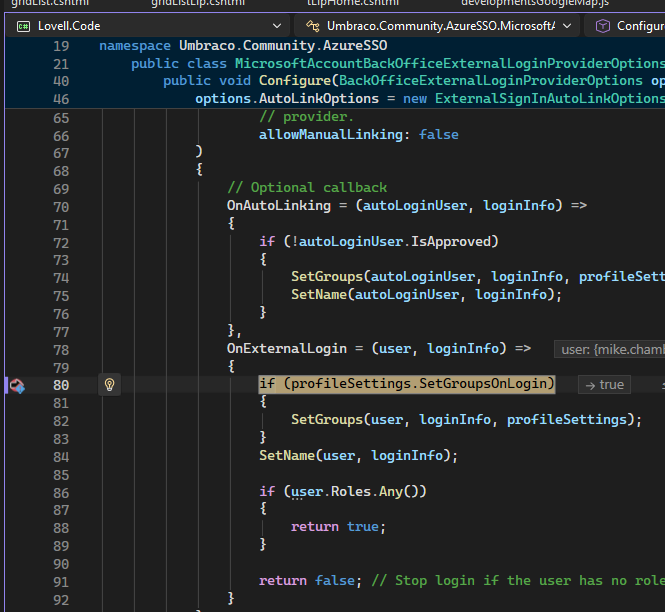
That is the key symptom, and it is not a debugger issue. OnAutoLinking and OnExternalLogin are delegates you assign to the options object. The breakpoints inside them only trigger if something invokes the delegate. The fact that you can break on the assignment lines but never inside the bodies means the assignment is happening but nothing is ever calling them. So the question is not “why won’t the breakpoints hit,” it is “why is the member external login pipeline never running these callbacks.”
The callbacks are only invoked when login goes through IMemberSignInManager.ExternalLoginSignInAsync, via Umbraco’s own member external login callback. The most common reasons that path is never reached:
You registered the provider as a back office login, not a member login. If you used .AddBackOfficeExternalLogins(...) / BackOfficeExternalLoginProviderOptions, the member sign-in manager is never involved, so the member callbacks can never fire. Members must be registered through .AddMemberExternalLogins(...) with MemberExternalLoginProviderOptions.
Scheme name mismatch. The auto-link options are tied to the external scheme name. If the scheme you registered the OAuth handler under does not match the member external login scheme Umbraco looks up, the provider authenticates but Umbraco never routes it into the member auto-linking pipeline.
A custom callback is handling the redirect. If your OAuth callback lands on your own surface/controller, or you call the ASP.NET Identity SignInManager directly and sign the member in yourself, you bypass Umbraco’s interceptors entirely. The external auth succeeds, the member gets signed in, and the callbacks are skipped. This matches your symptom precisely.
Quick way to confirm: put a breakpoint at the very start of the external login flow (the callback action that receives the provider redirect) and check whether it lands in Umbraco’s member external login controller or somewhere of your own. If it never reaches Umbraco’s controller, that is your answer.
If you paste your provider registration block (the AddMemberExternalLogins / services.Configure / AddAuthentication().AddOpenIdConnect(...) setup), I can tell you which of the three it is.
PS I think only fires on a login.. and not when refresh their existing session cookie without executing the full external login pipeline.
Update found this not to be the case.
Unteseted, but I think you could do something like this to intercept elsewhere in the openId flow
//options.Events = new OpenIdConnectEvents();

options.Events = new OpenIdConnectEvents
{
    OnAuthorizationCodeReceived = async context =>
    {
        // This fires the exact moment the auth code is sent back from Microsoft Entra ID
        var code = context.ProtocolMessage.Code;

        // You can place a breakpoint right here to inspect the incoming payload
        await Task.CompletedTask;
    },
    OnTokenValidated = async context =>
    {
        // This fires once the token signature has been fully validated,
        // but BEFORE the user is officially authenticated into the Umbraco Backoffice.
        var principal = context.Principal;
        var claims = principal?.Claims;

        // Great place to inspect raw AD claims or step through execution
        await Task.CompletedTask;
    },
    OnAuthenticationFailed = async context =>
    {
        // Good safety net to catch expired handshakes or cancelled logins
        await Task.CompletedTask;
    }
};
 As that’s a bug.
 Note on UX: If