I run umbraco 16 from a local environment, I built a website using Visual studio backed up my database and restored in on production. I created a publishing profile in Visual studio, that copied the files on a local folder. I uploaded those files on production. I updated appsettings.json on production so that the connection string is connected to my production database. .Net framework is the same version on both local and production.
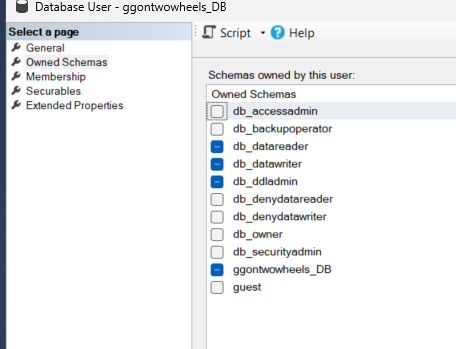
If I connect to my database using sql server management studio, I can see that it is the same as my local database. Users and content are there. DB user has db_datareader, db_datawriter, and db_ddladmin
However when I call my domain name that connects to production. I am redirected to umbraco/install as if it was a new instance.
I checked with ChatGpt and other AI who told me to add this in appsettings.json
If you see the Umbraco install screen when you visit the site, then it’s almost always a symptom of Umbraco not being able to talk to the database.
You should concentrate you debugging effort on that.
You’re not mentioning where and on what your hosting in production, so assuming it’s on Windows using IIS, then you might have to Recycle the App Pool after changing appsettings.
Could you show the connection string setting for production and tell which appsettings files it’s in? DON’T INCLUDE PASSWORD, USERNAME OR SERVER.
As for the ChatGPT response, that is not really going to do much for you.
It’s using a wrong key and the Minification was removed in V14:
I also tried the same connection using the IP address of the server (no joy)
Interestingly I can connect using SQL management studio using the same credential!
The other thing I did, was to test by changing the connection string from my local DB to connecto to the Production DB using their IP address. I also end up with the Umbraco install page.
I am not too sure what to do next. The hosting company is quite responsive, but not sure what to ask them at this stage.
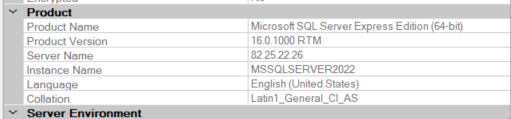
Also I noticed that the sql server version is slightly different (which didn’t seems to generate any errors when I restored the local db content to production
Probably also need info on your infrastructure..
Is your Production Env a server with web head and sql server on the same box?
Interestingly I can connect using SQL management studio using the same credential!
When you say this the assumption is that you are running SQL Mgmt on the production box (remote desktop)?
But would help troubleshoot with concrete info
Another quick check could be to add your db user to the db_owner role.. to discount any permissions issues with the login and Umbraco specifically.
(though you are following the docs for a restricted db_user Requirements | Umbraco CMS)
In my experience, if you’re redirected to the login screen it means the connection string is empty or the configured version is wrong. If Umbraco can’t connect to the database it will error.
From the thread it looks like you’ve covered off the ConfigurationStatus issue.
This leaves a blank connection string. Are there other appsettings environment files that match the ASPNETCORE_ENVIRONMENT your site is running in? Is your publish profile correctly setting the environment? Is there anything overriding appsettings in your hosting environment?
You, usually, cannot just connect to a SQL Server from outside a trusted/internal network.
So I wouldn’t expect this to work:
As others state, what is you infrastructure setup?
Are there multiple server, are Umbraco and SQL Server in the same machine.
Also, did you recycle the site after modifying the appsettings?
Are you modifying just appsettings.jsonor are you using appsettings.{Environtment}.json?
The connection string you provided looks fine, if Umbraco is on the same server as your SQL server.
Without revealing your DB password - check for special chars - if there’s anything like quotes they might need escaping. Used to be more of a problem with xml based web.configs but try wrapping your password in quotes.
But more likely this looks like either:
You’ve changed the app settings.json for production after the site has started and it needs restarting to pickup your changed conn str?
You have an ASPNETCORE_ENVIRONMENT setting setup and it’s actually using an environment version of the app settings.json and this sql connection is being overridden with an incorrect one.
You possibly could have a secrets file in the hosting setup that’s overriding your app settings.
I wanted to thank you all, I really appreciated you taking time to assist.
The issue is now fixed and it was indeed database related. On my local machine, my Umbraco database was using the default Schema dbo. When I restored the DB to production, the SQL login I had to create wasn’t mapped to dbo. as its default schema.
SQL used as schema the same name as the DB user on my hosting environment “myUser_DB“. o when Umbraco connects, it looks for tables in the current schema.
Since it doesn’t find them in “myUser_DB”, it assumes no install exists and creates fresh tables in that schema, next to your my real content in dbo.
Fix was to set dbo. as default schema for my DB user, and all is well Hope this makes sense!